
Adult Day Care Activity Ideas to Keep Clients Engaged
Adult day care centers provide a vital service, offering a ...

Adult day centers succeed or struggle based on whether daily operations run as a connected system - staffing, attendance, services, documentation, and reporting. The best adult day care management software reduces the handoffs between those steps, gives supervisors real-time visibility into what's missing and what's at risk, and makes documentation feel like the natural output of a well-run day rather than a separate administrative burden.
Ankota is built for exactly that kind of connected operation, bringing scheduling, attendance, billing workflows, and oversight into one platform so adult day programs aren't stitching together tools that don't talk to each other. This guide covers what to evaluate, what to implement first, and how to avoid buying software that performs well in a demo but collapses under the reality of daily operations.
Why Adult Day Software Matters More Now Than It Used ToAdult day services aren't a niche program type anymore. They're a critical and growing component of the home and community-based care landscape, with CDC estimates placing roughly 182,000 participants in adult day programs on any given day nationally. NADSA data reflects continued program growth to meet rising HCBS demand, and federal policy continues pushing toward person-centered, community-integrated services rather than institutional settings.
What that means in practice is that adult day programs are operating under more pressure than they were a decade ago - more participants, tighter staffing, higher documentation expectations, and increasing scrutiny on outcomes and quality. The programs that manage that pressure well are the ones that have built operational systems where information flows cleanly from step to step. The ones that struggle are the ones where every step is handled separately, which means every handoff between people or systems is an opportunity for something to be late, missing, or inconsistent.
That's the lens through which adult day care management software should be evaluated. Not "does it have the features we need" - but "does it reduce the points where things fall apart."
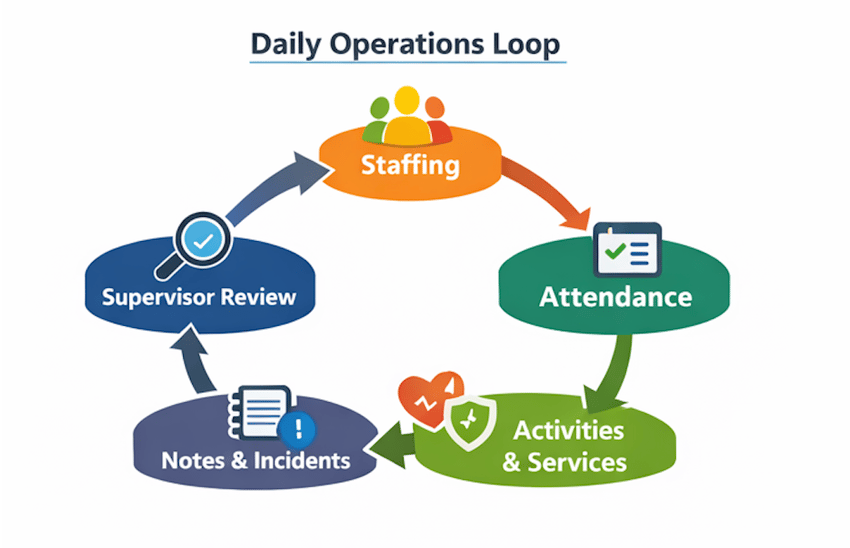
The simplest way to understand what adult day care management software needs to do is to trace the daily operational loop that every center runs through: staffing and coverage → attendance and census → services and activities → documentation and incidents → supervisor review → reports and exports. If any step in that chain is disconnected from the others, you end up with the same operational pain you had before, just with a login screen in front of it.
Every time information moves from one person to another or from one system to another, there's a risk: missing data, inconsistent data, late data, or duplicated data. A coordinator who manually copies attendance numbers into a separate spreadsheet to generate a weekly report isn't just doing extra work - they're introducing a point where errors accumulate and where the report's reliability depends on whether that manual step happened correctly.
The right platform eliminates those handoffs rather than adding new ones, and that principle - reducing handoffs, not creating them - is the most useful single filter for evaluating any software in this space.
Staffing in adult day care isn't just a schedule. It's coverage by role and shift against an expected census that changes every day, often including transportation coordination, clinical oversight depending on your model, and task assignments tied to specific participants rather than general duties. A scheduling system that can only show you who is working on a given day isn't managing adult day operations - it's managing a shift calendar.
What a genuinely useful scheduling workflow provides is a role-based view - program staff, aides, nurses and clinical staff, drivers, and supervisors - mapped against the day's expected census so that coverage gaps are visible before they become operational problems. Task assignment tied to participants rather than to sticky notes or group text threads means that incoming staff know what's expected before the day begins. And secure internal communication built into the operational context means that when a driver calls out at 7am or a participant's routine changes, the update flows to the people who need it without a phone chain.
Here's what that looks like in a morning that doesn't go according to plan. Two participants arrive early, one driver calls out, and there's a new staff member shadowing for the first time. A connected scheduling system lets the supervisor update coverage, confirm census, adjust task assignments, and keep the day moving without rebuilding the plan from scratch on paper or in a spreadsheet. That kind of real-time adaptability is what separates a scheduling tool from an operational management system.
In our experience across home and community-based programs, the supervisors who spend the least time chasing updates are the ones whose systems give them a live operational view rather than requiring them to assemble one manually from multiple sources.
Attendance is where daily operations become real data, and if attendance tracking is messy, everything downstream becomes unreliable - activities, notes, billing-related exports, and reporting. A system that makes attendance capture slow or ambiguous doesn't just create a frontline inconvenience. It creates a cascade of problems that a director sees at the end of the month when the numbers don't add up.
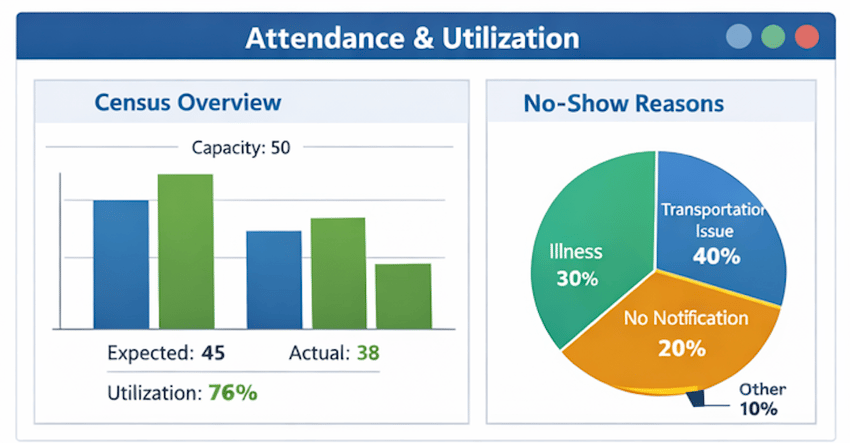
What to require from an attendance system is fast check-in and check-out with clear timestamps and minimal steps, session-based and driver-based grouping that reflects how centers actually move participants through the day, a live capacity view showing expected versus actual attendance so supervisors can see the day's shape as it develops, and no-show tracking with reason codes that make trends explainable rather than just visible.
Utilization data - the relationship between capacity and actual attendance across days and programs - is where attendance tracking becomes a management tool rather than just a record. Supervisors and directors who have reliable utilization data can answer questions that matter operationally: are we staffed for our real attendance patterns, or for an ideal census that rarely materializes? Are specific days of the week consistently underfilled, and does that reflect a service design problem or a scheduling one? Are there patterns in no-shows that suggest transportation issues, family circumstances, or participant health trends worth flagging to a case manager? Those questions can't be answered from an attendance log alone - they require a system that surfaces patterns rather than just storing timestamps.
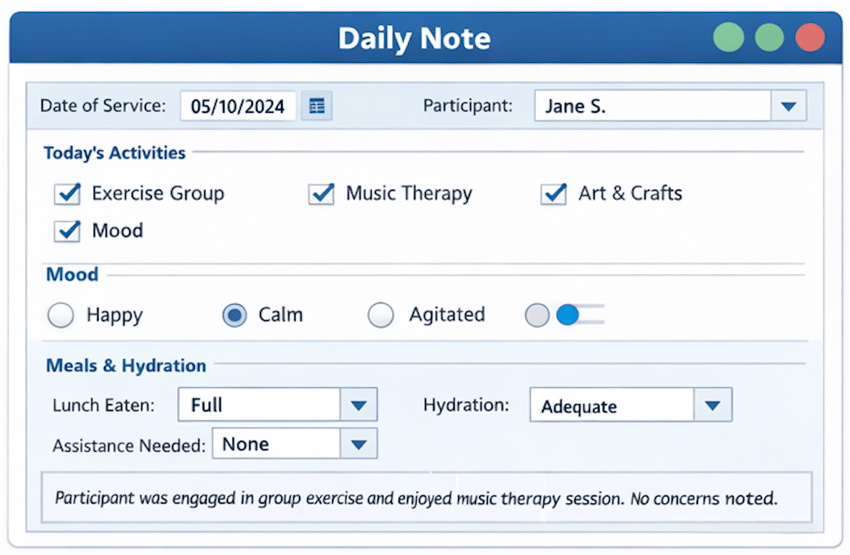
Documentation shouldn't be extra work that happens after the real work is done. The programs where documentation quality is highest are the ones where documenting is built into how operations flow, so that completing a shift note, recording activity participation, or logging an incident is a two-minute extension of what staff are already doing - not a separate task that competes with care for time and attention.
The best documentation systems do three things well. They standardize what's required through templates, pick lists, and required fields that are genuinely necessary rather than comprehensive, so that staff know exactly what a complete note looks like and can produce it consistently. They simplify the frontline experience by making the most common documentation actions fast on a mobile device - check in a participant, record activity participation, write a daily note, log an incident. And they surface exceptions so that supervisors see what's missing and who needs follow-up without having to hunt for it.
A useful evaluation standard is what we call the two-minute note test. In a demo, require the vendor to let you do the full sequence on a device similar to what your staff use: check in a participant, record activity participation, enter a daily note, and log an incident. Time it. If it takes significantly longer than two minutes, you will get late notes, missing notes, and supervisors who spend their time chasing paperwork rather than managing operations. That's not a training problem - it's a design problem, and it doesn't get better after go-live.
AI-assisted operational support - reducing administrative burden and surfacing actionable insights for supervisors - is becoming a practical reality in this space as staffing pressures continue. The programs getting the most value from it are the ones that have first established clean underlying workflows, so the insights are being generated from reliable data rather than filling in gaps that a better process would have prevented.
If the software can't produce reliable reports without significant manual reconstruction, it's data storage rather than management software. The distinction matters because the point of operational software isn't to hold records - it's to help people make better decisions faster.
Directors need two reporting cycles that serve different purposes. The weekly operations report is the director's control panel - attendance and no-show trends that identify patterns before they become chronic, documentation completion rates that surface whether frontline staff are keeping up or falling behind, incident counts by category that flag anything requiring follow-up or escalation, staffing coverage issues including gaps and early overtime signals, and an activity participation snapshot that functions as a proxy for participant engagement.
The monthly leadership report serves a different audience and a different purpose - it's the quality and growth picture that goes to ownership, a board, a funding source, or a state oversight body. That means utilization data showing capacity against actual attendance over the month, participation trends by program type that reflect whether the program mix is matching participant needs, operational bottlenecks where delays repeat across the month, and the kind of evidence that supports funding narratives or improvement initiatives when asked.
Both reports should come out of the system directly, not from a coordinator spending a few hours each week pulling exports and rebuilding them in Excel. If a vendor's standard reports don't match your operational reality and custom reporting is an add-on, that's a real cost to factor into your evaluation - both the financial cost and the ongoing labor cost of maintaining a manual reporting process alongside software that was supposed to eliminate it.
Most implementations fail not because the software is wrong but because too much is launched at once. The sequence of what you implement first determines whether staff adopt the system or avoid it, and adoption is what makes every other feature actually work.
The first phase - roughly the first two to three weeks - should establish the daily heartbeat: participant profiles with minimum viable data, attendance workflows including session setup and check-in and check-out, one daily note template, and a supervisor exception view that shows who is missing documentation and what needs follow-up. These are the things staff must do every single day. Getting them right and making them fast is the foundation that everything else builds on.
The second phase, typically weeks three through six, adds operational depth: an activities calendar with participation tracking, incident and health check documentation if applicable, task and reminder workflows, and the weekly reporting pack. These are important, but they're easier to adopt once the daily heartbeat is stable and staff have built the muscle memory for the core workflow.
The third phase - weeks six through ten - is where scale and governance come in: role-based permissions, data standards for service categories and reason codes and naming conventions, multi-site standardization if applicable, and the monthly leadership reporting cadence. Launching all of this in the first week creates confusion and erodes adoption. Sequencing it after the fundamentals are solid creates confidence.
The principle we come back to in every implementation is to start with what staff must do every day, and let everything else wait. A system that staff use consistently at 60% of its capability delivers more operational value than a system that staff avoid because it was configured at 100% of its capability from day one.
The most useful evaluation questions are the ones that require a live demonstration rather than a verbal answer. Ask to see today's census view and how it updates in real time. Ask the vendor to demonstrate how a frontline staff member completes a daily note in under two minutes - on a phone, not on a desktop. Ask to see the supervisor view of missing documentation and what the exception workflow looks like from there. Ask to see how the system handles an early departure, a late arrival, and a partial-day attendance record. Then ask for a live export of an attendance log and a weekly director report, and evaluate whether the format is actually usable or whether it requires reconstruction.
The governance questions matter too but are often skipped. What roles and permissions exist out of the box, and how are they configured? How do you standardize templates and service categories across multiple sites? What controls prevent accidental edits or inconsistent naming that corrupt trend data over time?
The vendor reality questions are where a lot of evaluations get soft. What does onboarding actually include - admin setup, data migration, template configuration, and staff training are four different things, and "implementation is included" often means only one of them. What are the support response time commitments? And what does a workflow change cost and take after go-live - because every adult day program discovers something during the first 90 days of live operation that requires an adjustment?
Adult day care is increasingly part of a broader care ecosystem rather than a standalone program. Organizations that operate adult day alongside home care, Medicaid waiver programs, IDD services, or self-direction programs face a compounding problem when those services run on separate software: duplicate data entry, manual reconciliation between scheduling and billing, and reporting assembled from three different exports every time leadership needs a picture of the organization's performance.
Ankota is built for that connected complexity. Where most adult day software is a point solution designed for a single program type, our platform supports coordinated operations across home care, adult day, IDD, and self-direction - which means the workflows, reporting, and compliance processes don't have to be rebuilt separately for each program you operate. For adult day programs specifically, that means attendance and documentation workflows that connect to billing-ready outputs, scheduling that reflects the real staffing picture across all programs rather than just the day center, and supervisor dashboards that give operational visibility without requiring a coordinator to manually compile it.
For organizations managing multiple service lines or planning to add adult day as a strategic growth area alongside existing home care or HCBS programs, that architecture changes the operational calculus significantly.
The best adult day care management software doesn't win because it has the longest feature list. It wins because it makes daily operations simpler, more reliable, and more visible: staff spend less time documenting and more time caring, supervisors manage exceptions instead of chasing updates, and directors get weekly and monthly reporting without rebuilding the truth in Excel.
Adult day services are growing in importance and in scrutiny. A connected operational system is no longer a nice-to-have - it's how programs protect care quality and stay sustainable as complexity increases and staffing pressure continues.
If you're evaluating adult day care management software - or you're stuck with a system that staff consistently avoid - request a workflow-based Ankota demo focused on your real day: staffing coverage and daily census, attendance tracking and utilization, documentation completion and supervisor exception views, and the weekly and monthly reporting pack. Bring your current pain points, and we'll map them to a practical connected workflow so you can make a decision based on operational evidence rather than demo impressions.
Adult day care has operational logic that general-purpose software doesn't handle well: group-based attendance tracked by session and transportation route, activity documentation that needs to reflect participant-level engagement within a shared program, documentation workflows fast enough for frontline staff who are actively supporting participants rather than sitting at a desk, and reporting that reflects census patterns and participation trends rather than just individual transactions. General software can store data. Adult day management software should reduce the daily work of capturing it, organize it into the operational views that supervisors and directors actually need, and make the exports that billing workflows depend on accurate and reliable.
The daily operational loop in any adult day center runs from staffing and coverage through attendance and census, through services and activities, through documentation and incidents, through supervisor review, and into reports and exports. The useful question to ask about any platform is whether it connects those steps or treats them as separate functions. When each step is connected to the next - when attendance automatically reflects check-in data, when documentation is tied to the same participant record, when supervisor exception views pull from the same source as the weekly report - the administrative burden shrinks and the data is reliable. When each step requires separate manual work or a separate login, every handoff is a point where errors accumulate.
The two-minute note test is the most revealing single evaluation. Ask the vendor to let you complete a full documentation sequence on a mobile device similar to what your staff use: check in a participant, record activity participation, write a daily note, and log an incident. Time it. If it can't be done in roughly two minutes on a phone, your frontline staff will find workarounds - incomplete notes, end-of-day memory-based documentation, or documentation that doesn't get done at all. That's not an adoption failure. It's a design failure, and it doesn't improve after go-live.
Attendance data and service documentation are the upstream inputs that determine billing accuracy. If attendance records are incomplete or inconsistent, and if service documentation doesn't map cleanly to service definitions and authorization rules, billing workflows operate on unreliable data regardless of how sophisticated the billing tooling is. The evaluation question worth asking is: show me how a documentation gap or an attendance exception surfaces before it affects billing readiness - not after a claim is denied. Platforms that surface those issues proactively are doing fundamentally different work from platforms that log data and leave the quality review to someone's monthly reconciliation process.
Start with what staff must do every single day - participant check-in, daily notes, and the supervisor exception view that shows what's missing - and make those workflows fast and intuitive before adding anything else. The programs where adoption is strongest are the ones that launched a minimal viable workflow, let staff build confidence with it over two to three weeks, and then added activity tracking, incident documentation, and reporting in a second phase once the daily routine was stable. Launching everything at once creates confusion and erodes trust in the system before it's had time to prove its value.
The key issue is fragmentation. An organization running adult day alongside home care, Medicaid waiver services, or a self-direction program on separate software systems ends up with duplicate data entry, manual reconciliation between scheduling and billing, and reporting that requires someone to pull exports from multiple places and combine them every time leadership needs a complete picture. Platforms built for connected HCBS operations rather than single program types solve that problem structurally - attendance, documentation, scheduling, and billing-related workflows share the same underlying data rather than running in parallel and requiring staff to act as the integration layer.
Ankota's mission is to enable the Heroes who keep older and disabled people living at home to focus on care because we take care of the tech. If you need software for home care, EVV, I/DD Services, Self-Direction FMS, Adult Day Care centers, or Caregiver Recruiting, please Contact Ankota. And if you're ready to see how the most innovative agencies are using AI to empower their caregivers and automate the rest, meet your new companion at www.kota.care.

Aditya Chaudhry is a STEM MBA candidate at Babson College (graduating May 2026), focusing on AI and statistics. He leverages his successful background driving company growth in India to deliver impactful data-driven solutions.
.png)
.png)




Trusted by home care agencies nationwide