
Adult Day Care Activity Ideas to Keep Clients Engaged
Adult day care centers provide a vital service, offering a ...

Adult day care software typically comes in three pricing models - per participant/month, per user/month, or per facility/location. The right model depends on how your center grows: census-driven, staff-driven, or site-driven. But the sticker price is rarely the full story. Implementation, migration, custom reporting, and integrations are where real costs hide. Use the three-scenario budgeting method and the apples-to-apples comparison checklist below to build a number you can actually defend to leadership. Ankota’s per-participant pricing is an all-in transparent tier based on the "per participant/month" model and has pricing bands that are affordable for small agencies while giving volume discounts for larger agencies.
Before you talk numbers, make sure you understand the core functionality that defines a modern adult day care software system.
If you've spent any time requesting quotes for adult day care software, you've probably noticed that no two vendors price the same way. One gives you a per-participant monthly rate. Another quotes per user. A third offers a flat site fee. And all three tell you implementation is "included."
The challenge isn't finding a price - it's understanding what you're actually comparing. A $3 per participant quote sounds inexpensive until you realize migration isn't included, your custom attendance export will cost extra, and the per-participant count includes enrolled participants, not just active ones.
What we've seen from working with adult day programs is that the operators who budget most accurately are the ones who force every quote into the same structure before comparing. Here's how to do that.
This model scales with your participant count and is common among platforms built specifically for adult day and HCBS-adjacent programs. You'll see published rates like $2.99 per participant/month for a core module or higher for bundled features.
It makes the most sense for programs where census is a fairly stable driver of operational workload - where more participants genuinely means more documentation, more scheduling, and more reporting. The watch-out is definitional: make sure you know whether "participant" means active, enrolled, or billed. A center with 90 enrolled participants but 60 average daily attendance will get a different number depending on which definition applies. Seasonal fluctuation is also worth modeling - if your census swings 30% between summer and winter, your monthly cost swings with it.
This model scales with staff licenses rather than participant volume. It's more common among general-purpose software platforms that serve multiple care settings, and you'll find a wide range of starting prices in marketplace listings.
It works well for organizations with relatively stable staffing counts and clear role definitions. The adoption risk is worth flagging: if frontline staff are avoiding the system because every login costs a license, you end up paying for software that half your team doesn't use consistently. Also confirm how part-time and seasonal staff are handled - some platforms require a paid seat regardless of hours worked.
This model trades variable pricing for predictability. One flat monthly rate covers an entire site, typically with unlimited users included. Vendors who use this model often emphasize the inclusions - support, training, upgrades, and users - as a way of showing total value rather than just a low headline number.
It's usually the best fit for centers with high staff turnover or large teams, where per-seat pricing would get expensive quickly. The questions to ask: what exactly constitutes a "location," whether a central administrative office that accesses participant records for a single site needs its own license, and how add-on services like integrations or custom reports are priced on top of the flat rate.
Seeing how different platforms stack up can help you justify the cost; view our full vendor comparison to find the right fit.
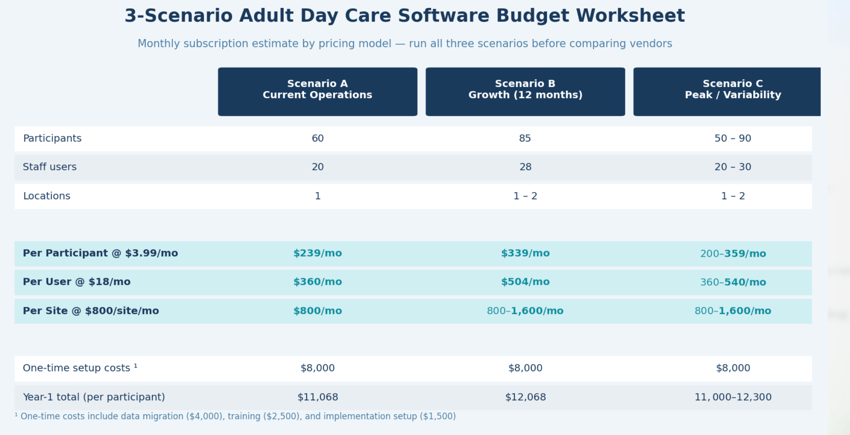
The most common budgeting mistake is getting a quote based on current operations and signing without modeling growth. Run three scenarios before you evaluate any vendor.
Scenario A - Current operations: Use your real numbers. If you have 60 participants, 20 staff users, and one location, that's your baseline.
Scenario B - Growth case: Project 12 months out realistically. If you're targeting 85 participants, 28 staff, or a potential second site, build that quote too. A pricing model that looks affordable at 60 participants can look very different at 85.
Scenario C - Seasonal variability: If your census fluctuates - say, between 50 and 90 across the year - model both ends. For per-participant pricing, calculate what you'd pay at peak and off-peak, then average it. That average is your real monthly cost, not the number based on a single month.
Once you have three scenarios per vendor, normalize them into a consistent monthly estimate. This gives you a genuine apples-to-apples comparison, not just a comparison of different vendors' most favorable numbers.
A note from the team - The Excel Rebuild: One of the agencies that we work with are wonderful at providing care, but they're not very good with Excel. And what I saw was that in order for them to get the data into the format that was needed by the payer was taking them four to five hours per week. A couple of the reasons were that in their report that came out of their current system, it had the first name and the last name together, but then they were manually needing to separate the first name from the last name in the Excel. And also it had the amount to bill for each visit, but it only allowed them to put in one hourly price per home care, so what they had to do was to look at which clients had different payers and manually change the price and then build formulas to recalculate. If you think about this being something that takes an owner five hours to do every week just to get their billing out, just think of the time that they could be spending instead helping with their clients in the center, coaching care staff or going out in the community and doing higher value work.
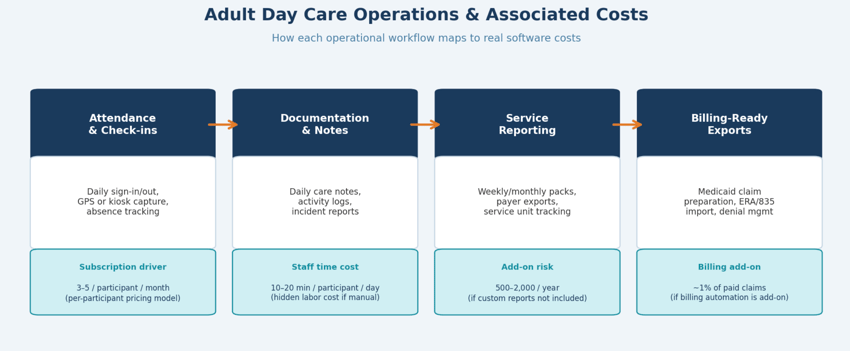
Pricing at its simplest covers software access. But adult day care software has to work daily across attendance, services, documentation, reporting, and export workflows. The subscription is only the foundation.
The minimum inclusions you should expect in any contract are implementation onboarding (admin setup and workflow configuration, not just a link to a help center), staff training for both administrators and frontline users, core templates for attendance logs, daily notes, incident reporting, and activity tracking, plus product updates and a clear data retention and export policy - especially if your workflows touch HIPAA-covered information.
Some vendors list these explicitly in their published pricing. Others include them in a flat site rate by design. The important thing is to ask for the "included vs. not included" list in writing before you sign, not after.
Investing in the right tools is just the start—learn how to leverage your technology to stand out from other centers in your area.
Even vendors who say "no hidden fees" often have costs that don't appear in the initial quote. Here are the categories worth asking about specifically.
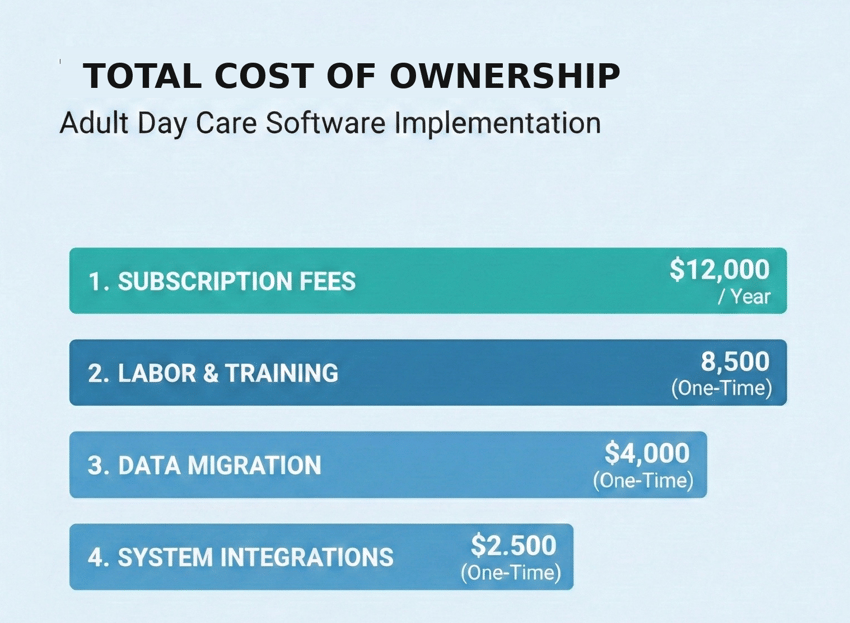
Data migration is the most common surprise. Moving participant profiles, attendance history needed for audits or trend analysis, service definitions, and scanned documents into a new system takes real time - either vendor time that gets billed, or internal time that gets absorbed. Neither is free.
Custom reports and exports matter more than buyers expect. Program directors typically need weekly and monthly reporting packs that don't match a vendor's standard templates. If the standard reports don't match your reality, you're either paying for custom report development or rebuilding everything in Excel indefinitely. That Excel rebuild is a hidden labor cost that rarely shows up in a software comparison but adds up quickly.
Integrations require individual confirmation. A vendor's marketplace page may list payroll, accounting, and billing integrations as available, but you still need to verify your specific systems and workflows. "Available" and "configured for your use case" are different things.
Ongoing training is underbudgeted in almost every implementation. Adult day programs have meaningful staff turnover. A strong initial training doesn't stay strong when a third of your staff has changed six months later. Budget for periodic refresh training or build it into the governance plan.
Real World Example - The Hidden Cost Discovery: A few of the surprises that we've seen from other adult daycare systems is that they have a base price which seems low, but then there's a high per-client price afterwards. Secondly, sometimes in adult daycare centers, we have seasonal people or people who only are on the roster but don't come in, so you should make sure that you're only being billed for the clients who are participating in your center. And then a third thing is some have this low kind of a base fee, as they say, but then every additional feature like the family application or the ability to do e-billing or the connection to your QuickBooks or to your payroll system all come with big price tags.
If your software touches billing workflows - even indirectly through service documentation and exports - it's worth understanding how the downstream process works before you evaluate features.
After claims are processed, providers receive remittance details electronically via ERA (835 files) or on paper, with adjustment codes and adjudication information that tells you why a claim was paid, reduced, or denied. If your software can't produce clean service logs and reliable exports upstream of that process, billing automation features won't help - the data quality problem comes before the automation.
Some vendors offer billing automation as an add-on priced as a percentage of paid claims, bundling eligibility verification, claim submission, ERA import, denial management, and accounts receivable reporting. That's a reasonable pricing mechanism, but it only generates value if the attendance documentation and service data feeding it are accurate. Budget for the data quality work, not just the billing tool.
Here's the method we recommend for anyone doing a formal evaluation.
Start by building one comparison table that forces every vendor into the same structure: pricing unit (participant, user, or site), monthly estimate across your three scenarios, what's explicitly included, what costs extra, and contract terms including renewal, pricing increases, cancellation terms, and what happens to your data when you leave.
Then convert hidden labor into actual dollars. Ask yourself how many coordinator hours per week currently go to attendance reconciliation, chasing missing notes, and rebuilding reports that should come from the system. Multiply by your loaded hourly cost. That number is part of your total cost of ownership comparison, even if it doesn't appear on any vendor quote.
Finally, score risk alongside cost. Pricing risk isn't just what you pay today - it's adoption risk if the system is too complicated for frontline staff, reporting risk if you can't trust the exports, support risk if response times don't match your operational reality, and scaling risk if the pricing model gets expensive faster than your program grows.
Even when onboarding is technically included, every implementation requires internal resourcing. Plan for a program owner - usually the director or administrator - to lead the project, a frontline champion who can give workflow feedback from the floor, and a reporting owner who defines the weekly and monthly output the system needs to produce.
We also recommend phasing the implementation rather than launching everything at once. Start with attendance, daily notes, and exception handling. Once that's stable, add activity tracking, incident documentation, and your core reporting pack. Integrations and advanced workflows come last. This sequence reduces disruption and improves adoption, which is ultimately what determines whether the software investment pays off.
Adult day care rarely exists in a vacuum anymore. CDC data estimates roughly 182,000 participants receiving adult day services on any given day in the U.S., and a growing number of those programs are operated by organizations that also provide home care, manage I/DD waiver services, or run self-direction programs alongside their day centers.
When that's your reality, the pricing question isn't just "what does adult day software cost" - it's "what does fragmentation cost." Duplicate data entry across systems, manual reconciliation between scheduling and billing, and reporting built from three different exports all add up to a real operational burden that doesn't show up on any vendor's quote sheet.
Ankota is built for that connected complexity. Where most adult day software is a point solution designed for a single program type, Ankota's platform supports coordinated operations across home care, adult day, I/DD, and self-direction - which means the workflows, reporting, and compliance processes don't have to be rebuilt separately for each program you operate. For organizations managing multiple service lines or planning to add adult day as a strategic growth area, that architecture changes the total cost calculation significantly.
Adult day care software pricing is straightforward once you force it into your reality. The per-participant model makes sense if census drives your workload. Per-user works if your staffing is the primary variable. Per-site gives you predictability if you have a large team or high turnover.
But the model is only the starting point. Run your three budget scenarios, demand a written included/excluded list, and build migration, reporting setup, and integration costs into your evaluation before you compare. The operator who does that work upfront avoids the conversations that happen six months after go-live about costs nobody planned for.
Ready to build a clean budget for your center? Request a pricing walkthrough with Ankota - we'll map your attendance volume, staffing model, reporting needs, and growth plan to a clear range that includes the line items most quotes skip.
What is the average cost of adult day care software? It varies significantly by model: per-participant pricing typically runs $2-6/month per participant, per-user pricing ranges widely depending on the platform, and per-site flat rates can range from a few hundred to over a thousand dollars per month depending on program size and inclusions. The meaningful number is total cost of ownership - subscription plus implementation, migration, and any add-ons - modeled against your specific census and staffing.
Is implementation usually included in adult day care software pricing? It depends on the vendor and plan. Some include a structured onboarding process; others provide documentation only. Always ask for a specific description of what "implementation" includes - admin setup, data migration, staff training, and workflow configuration are four different things that may or may not all be in scope.
What hidden costs should I watch for when buying adult day care software? The most common ones are data migration (moving existing participant records and history), custom report development if the standard reports don't match your needs, integration setup for payroll or billing systems, and ongoing training as staff turns over. Ask every vendor for an itemized "not included" list before signing.
Should adult day care software include billing features? Billing readiness - clean service logs, reliable exports, and documentation that supports Medicaid claims - matters more than billing automation. If your system produces accurate upstream data, billing workflows become manageable. If it doesn't, no amount of automation downstream will fix the problem.
How does adult day care software pricing differ for multi-site organizations? Per-participant and per-user models scale with your volume regardless of site count, while per-site models multiply by location. For multi-site operations, also evaluate whether the platform supports centralized administration and reporting across sites - that operational efficiency is part of the total cost comparison, not just the license fee.
What's the difference between adult day care software and home care software pricing? The pricing structures are similar, but the workflows differ. Adult day software is built around group-based attendance, activity tracking, and daily programming documentation. Home care software centers on individual visit scheduling, caregiver dispatch, and EVV compliance. Organizations that operate both programs should evaluate platforms that support both service lines to avoid duplicate systems and data reconciliation costs.
To explore innovative solutions for goal tracking and strategy management in disability services, visit Ankota. Our advanced software is designed to support providers in delivering exceptional care, enhancing efficiency, and achieving outstanding results for individuals with disabilities.
Ankota's mission is to enable the Heroes who keep older and disabled people living at home to focus on care because we take care of the tech. If you need software for home care, EVV, I/DD Services, Self-Direction FMS, Adult Day Care centers, or Caregiver Recruiting, please Contact Ankota.
And if you're ready to see how the most innovative agencies are using AI to empower their caregivers and automate the rest, meet your new companion at www.kota.care.

Aditya Chaudhry is a STEM MBA candidate at Babson College (graduating May 2026), focusing on AI and statistics. He leverages his successful background driving company growth in India to deliver impactful data-driven solutions.
.png)
.png)



Trusted by home care agencies nationwide