Solutions

Ankota offers end-to-end solutions for managing care delivery for older or disabled people in their homes and in day facilities. Additionally, some of Ankota's solutions can be unbundled modular components for companies that have home-grown or best of breed components but need additional add on capabilities.

    Resources

    Home Care, Day Services and Disability Services will continue to be among the most important industries wordwide for the next 2 to 3 decades. The resources provided here are designed to help you learn and grow. Thanks for being home care heroes and day service stars

      About Us

      Ankota creates software for organizations that keep older and disabled people living at home. Our primary products are software for Home Care, Electronic Visit Verification, Adult Day Services, and Long Term Supports and Services (LTSS) for people with Intellectual, Development Disabilities. We also support other players in this ecosystem like PACE programs, Area Agencies on Aging (AAAs), Centers for Independent Living (CILs) and more

          Blog Details

          Home Care Software Pricing: Costs, Hidden Fees, & How to Budget

          TL;DR

          Home care software pricing typically depends on volume (active clients/visits), users/staff, locations, and modules (scheduling, EVV, billing, payroll, portals, integrations). The “cheapest” quote often becomes expensive after implementation, add-ons, and workflow gaps trigger rework or claim delays. Use the budgeting framework and checklist below to estimate Year-1 costs and compare vendors fairly then choose the system that reduces administrative burden and protects revenue

          Why “Home Care Software Pricing” Is So Confusing

          If you’ve tried to price home care software, you’ve probably seen three patterns:

          • “Request a quote” with broad plan tiers (not enough detail to budget)
          • Base + per active client pricing (clearer, but still incomplete without add-ons)
          • Active-client pricing with lots of included features (better, but still hard to estimate Year-1 total cost)

          The problem isn’t that vendors are hiding information. It’s that home care operations are complex:

          • You may do private pay + Medicaid waiver + VA/LTCI.
          • You may need EVV compliance (and your state’s rules can be very specific).
          • You may have high caregiver turnover, high scheduling volatility, and constant documentation pressure.

          So the right question isn’t only: “What’s the monthly price?”

          It’s: “What will it cost us to run clean operations and get paid month after month?”

          Ankota perspective: In home and community-based care, software cost is often dwarfed by the cost of manual workarounds and missed visits, payroll corrections, incomplete documentation, EVV exceptions, and billing delays. Ankota is built to connect scheduling, documentation/EVV, and billing workflows so the work that happens in the field reliably turns into revenue.

          Home Care Software Cost Drivers That Actually Move the Number

          Pricing driver #1: Your volume unit (active clients, visits, or caregivers)

          Home care software cost often scales with one primary unit:

          • Active clients per month (common in private duty/non-medical)
          • Visits/shifts per month (common when scheduling volume is the main cost driver)
          • Caregivers/users (common in staff-heavy or per-seat tools)

          What to watch: If your agency grows, the pricing unit that seems cheapest today can become costly tomorrow. Always ask for a 12–24 month projection.

          Pricing driver #2: Modules and workflow depth

          Two agencies can have the same census but wildly different needs:

          • Scheduling only vs scheduling + EVV + billing + payroll + care plans + portals
          • Private pay invoices vs Medicaid waiver billing logic, authorizations, and compliance steps

          Pricing driver #3: Integrations and “ecosystem tax”

          If your software must integrate with payroll systems, accounting tools, EDI/billing clearinghouses, or state EVV aggregators, that can add:

          • One-time integration fees
          • Monthly connector fees
          • Ongoing support burden

          Pricing driver #4: Implementation complexity (the real Year-1 cost)

          Implementation is where pricing becomes real:

          • Data migration (clients, caregivers, authorizations, payer rules)
          • Workflow configuration (roles, approvals, visit rules, documentation)
          • Training + change management

          This is also where platforms differ: a tool can be “cheap” monthly and still cost you a fortune in disruption.
          Gemini_Generated_Image_pr73dqpr73dqpr73


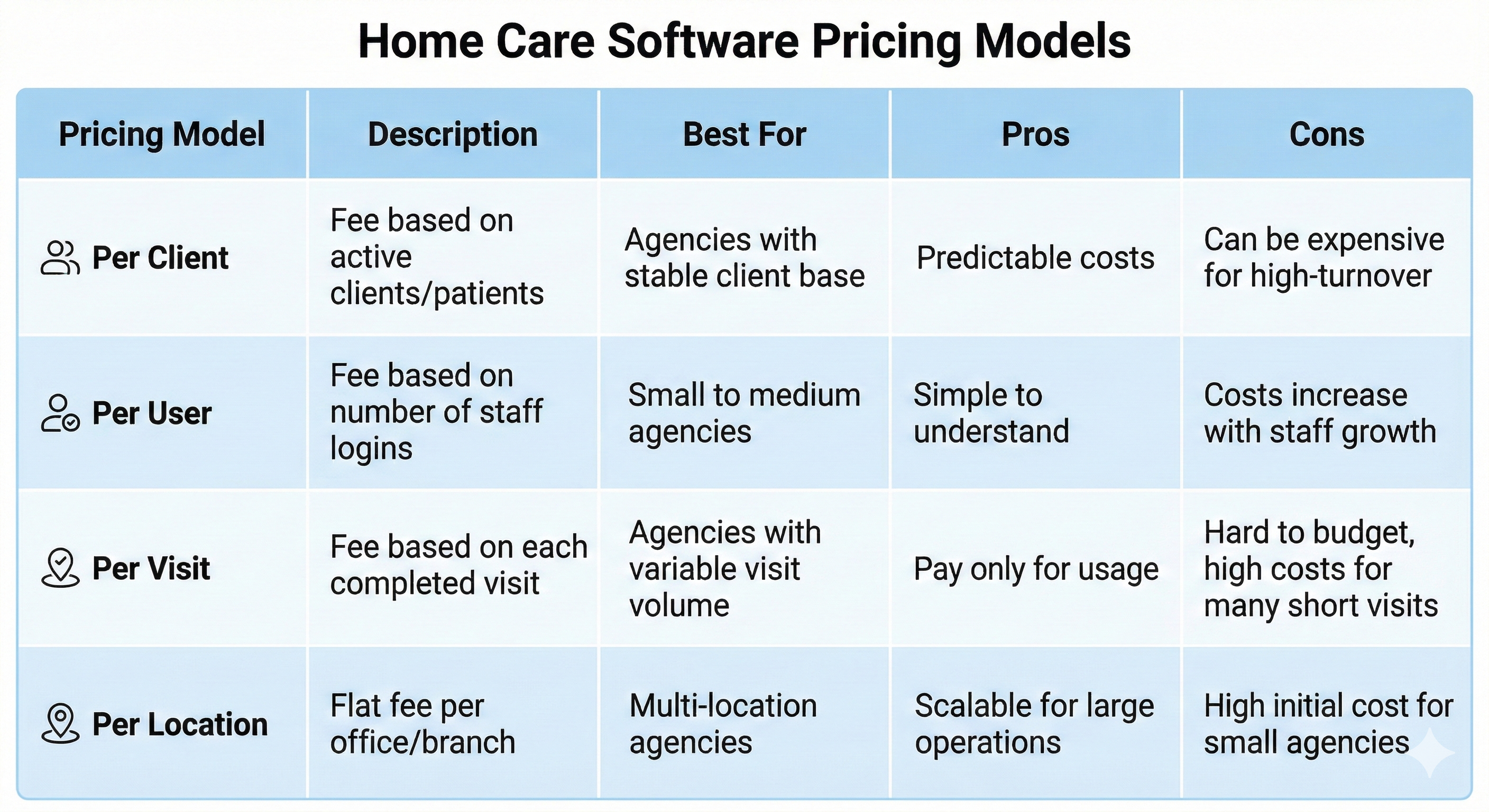
          Home Care Software Pricing Models Explained (and who each fits best)


          Per active client pricing (predictable growth model)

          Best for agencies where census aligns with workload.

          Pros: Easy to forecast.

          Cons: If you keep “active” clients who receive few hours, your cost per billed hour can rise.

          Per user / per caregiver pricing (seat-based)

          Best when staff usage drives value (many office users, supervisors, schedulers).

          Pros: Clear control over seats.

          Cons: Can penalize you for growth or multi-role access (training new staff, seasonal hiring).

          Per visit / per shift pricing (volume-based)

          Best when scheduling volume is the primary variable (high visit churn).

          Pros: Aligns cost to operational activity.

          Cons: Can feel volatile if visits spike unexpectedly (hospital discharge surges, winter weather changes).

          Per location pricing (multi-branch operations)

          Best when branches operate semi-independently.

          Pros: Clean structure for franchises/multi-sites.

          Cons: Can be punishing for small satellite offices.

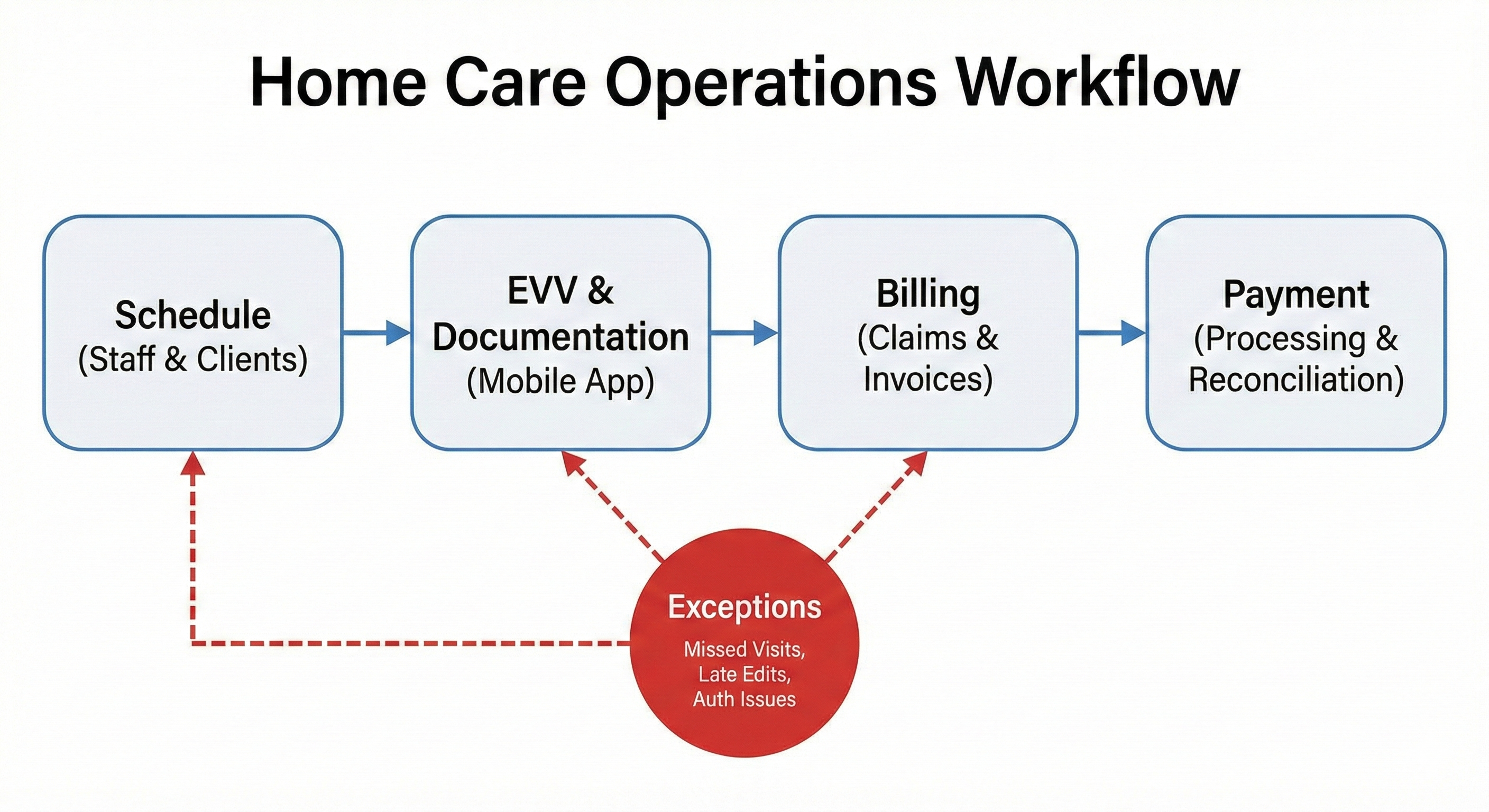
          Ankota perspective: Many agencies run into trouble when they buy a “scheduler” and then bolt on billing, EVV, and compliance tools later. Ankota’s value is in the connected workflow so the pricing conversation is about total operational cost, not just a scheduling license.Full home care operations flow


          The “Hidden Fees” That Make Quotes Misleading

          Here are the most common pricing surprises agencies discover after signing:

          Implementation fees and onboarding scope

          Ask whether onboarding includes:

          • Data migration
          • Configuration
          • Template creation (forms, care plans, notes)
          • Go-live support
          • Training for new hires later


          Add-on modules (EVV, billing, payroll, portals)

          Even when a vendor says “EVV included,” you should confirm which methods and workflows are covered. Always confirm if methods like telephony and GPS apps are included in the base subscription or charged as overages.

          Integrations, APIs, and reporting

          Common extra charges:

          • Accounting export
          • Payroll integrations
          • Advanced reporting dashboards
          • API usage limits

          Minimum monthly fees and contract terms

          If you’re a startup, minimums matter more than per-unit pricing.


          A Practical Year-1 Budget Framework 

          Home care software ROI starts with a Year-1 total cost estimate

          Use this simple worksheet logic (even before a formal quote):

          1. Monthly subscription estimate
            • Base fee + (pricing unit × rate)
          2. One-time costs
            • Implementation/onboarding
            • Data migration
            • Training time (internal hours × loaded labor cost)
          3. Add-ons and integrations (monthly + one-time)
          4. Risk buffer (10–20%)
            • For unexpected workflow changes, payer changes, new programs

          Compliance and Revenue Risk: Pricing Isn’t Just a Number

          If you take Medicaid-funded services, EVV isn’t optional: states must require EVV for Medicaid-funded personal care services and home health care services under federal timelines, with funding penalties for noncompliance.

          That matters for pricing because:

          • You’re not buying “software.” You’re buying clean claim-ready operations.
          • EVV exceptions and documentation gaps can create billing delays and rework.
          Ankota perspective : Ankota’s approach is built for the reality that billing is downstream of operations. When scheduling, EVV/documentation, and billing are connected, exceptions get surfaced earlier reducing the “end-of-week scramble” that drives payroll corrections and claim delays.
          A Checklist to Evaluate Vendor Quotes

          Questions that reveal the truth cost of home care software

          • What is the pricing unit (clients, visits, caregivers, users, locations)?
          • Are EVV workflows included? Which methods (GPS app, telephony) and exception management?
          • What’s included in implementation, and how many hours/support sessions?
          • Are there extra fees for:
            • Billing rules complexity (authorizations, payer formats)
            • Payroll exports or integrations
            • Portals (family portal, caregiver app)
            • Custom reports / dashboards
          • What is the minimum monthly fee and contract term?
          • What is the average go-live timeline for agencies like ours?
          • How does the platform reduce administrative burden (automation, workflow routing, exception alerts)?
          • What does support look like post-go-live (SLA, onboarding new office staff)?

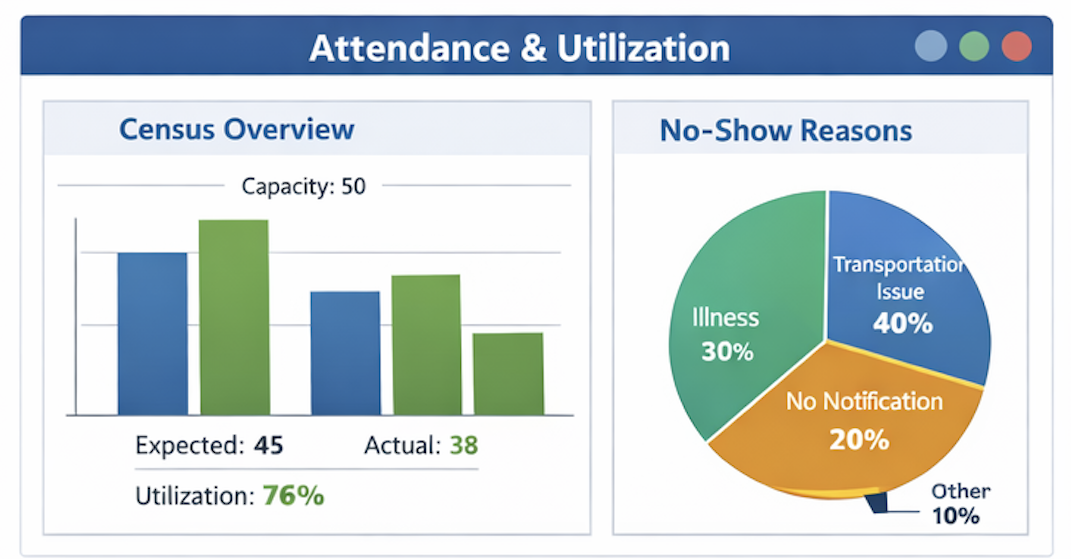
          Home Care KPIs


          What “Good Pricing” Looks Like in 2026

          “Good pricing” is not the lowest monthly bill. It’s pricing that is:

          • Predictable as you grow
          • Transparent about add-ons and implementation
          • Aligned to outcomes: fewer missed visits, fewer payroll adjustments, faster billing cycles
          • Designed for workforce realities: the direct care workforce demand is growing substantially, which increases operational pressure on agencies.

          Conclusion: How to Choose a Pricing Plan Without Regretting It

          If you only compare monthly subscription numbers, you’ll miss the real cost drivers: implementation burden, add-ons, integrations, and the operational rework that happens when scheduling, documentation/EVV, and billing aren’t connected.

          A smarter approach:

          1. Pick the pricing model that matches how your agency grows
          2. Estimate Year-1 total cost, not just monthly fees
          3. Evaluate how well the platform prevents downstream billing and payroll chaos
          4. Choose a system that reduces admin time and protects revenue especially under EVV compliance requirements.

          Let’s Run Your Numbers (No Strings Attached) 

          If you want, we can walk through your agency’s situation in 15 minutes and help you:

          • estimate a realistic Year-1 budget,
          • identify which pricing model fits your growth plan, and
          • map the workflow you need from scheduling → EVV/documentation → billing.

          To see how Ankota combines compliance, EVV, and billing into one cost-effective workflow, contact Ankota. Our advanced software is designed to support providers in delivering exceptional care, enhancing efficiency, and achieving outstanding results for individuals with disabilities.

          Share This Article
          Aditya Chaudhary
          Feb 17, 2026

          Leave a Comment

          Authors
          Aditya Chaudhary
          Feb 17, 2026
          Popular Blog

          Do You Want to Know How AI is Used in Ankota?

          Form Optimizing schedules to powering Kota Companion, AI is woven throughout our platform to make care smarter, safer, and more connected.

          Need Help

          Rectangle 34624182

          Group 1707485708

          Simplify care delivery. Improve outcomes. Start with Ankota.

          Trusted by home care agencies nationwide

          Group 1707485707