COMING SOON
- AI Clock-Out
- AI Signature Check
- Financial Management Systems Features
- Coordinators - Only show clients assigned + Read Only Schedule Board
- Add Documents from Visit Details
*** We have retired our old support email (support@ankota.com), please use our new email support@ankota.zendesk.com
June/July/August/September/October 2025 - NEW!
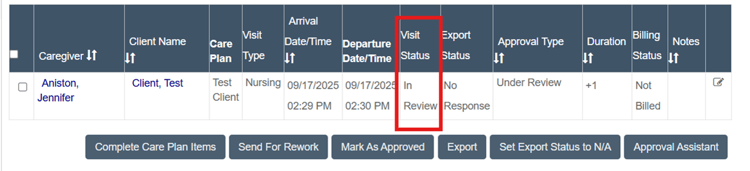
- Visit Approval Dashboard Visit Status "In Review" - This new status means Ankota is still processing the visit via our batch system. Once the batch is completed, you'll see status: needs approval or passed screening. This extra step ensures more accuracy | helpsite.com (universal).
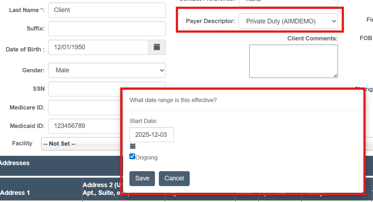
- Correcting Payer Descriptor/Agencies - Set date ranges when updating client payer descriptors. If the ongoing checkbox is selected, the new payer descriptor will be applied to all future visits. This feature ensures past visits will not be retroactively updated for accurate record keeping | helspite.com (universal)
- Set scheduled time to EVV time - If scheduled visit is created for 1-3p but the caregiver clocks in at 5-7p, the visit will show 1-3p time. History of "real" clock in/out times along with GPS will still be recorded. This can be useful for companies that have live-in caregivers where EVV is not required (optional)
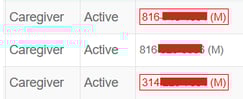
- Red Phone# - Caregiver phone# will be highlighted in red on the caregiver search page after three consecutive text message failures. Admin can hover over flagged numbers to view failure reason (universal).
- Assigned Caregiver
- Override Bill Code - allow administrators to set unique bill codes to customize rates per client/caregiver assignment (optional)
- Duration Limit - allow administrators to set daily limits for caregivers who schedule their own visit | helpsite.com (optional)
- NEW Caregiver Availability Tab - helpsite.com (universal if you already have existing tab)
- Set AR Screen Start Date - Instead of showing ALL, you can now customize the start date (ex: show AR from 1-1-2026). This is helpful for customers who want to "start fresh" and clear our older outstanding balances (optional).
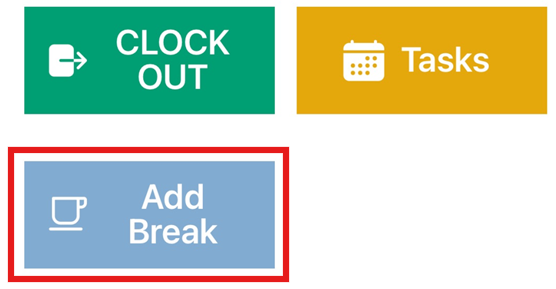
- Caregivers report Unpaid Breaks - Caregivers can manually enter unpaid break times in the mobile app. Entered times will be automatically deducted from the total visit duration. Ex: Visit duration 2hrs, 30 unpaid break added, new billable visit time is 1hr 30min | helpsite.com (optional)
Universal features have automatically been implemented to your environment. Optional features need to be configured by an Ankota specialist. If you'd like any of the optional features added to your system, please contact support@ankota.zendesk.com. If you see helpsite.com, please click on the link to learn more. Thank you!
March/April/May 2025
- Set Expense Reporting | helpsite.com (optional)
- Violation - Expenses were Reported
- View Expense in VAD
- Set EVV Times to Scheduled Times - No matter caregiver clock in/out, this setting will snap to scheduled arrival and departure times. Example: scheduled for 1-3p, but caregiver clocks in at 1:30, the clock in time will update to 1p (optional).
- Hide Report Errand Miles on Visit Types (optional)
- Split at Midnight at Organization End of Week - for customers that need to ensure a clear separation between weeks for payroll and billing | helpsite.com (optional)
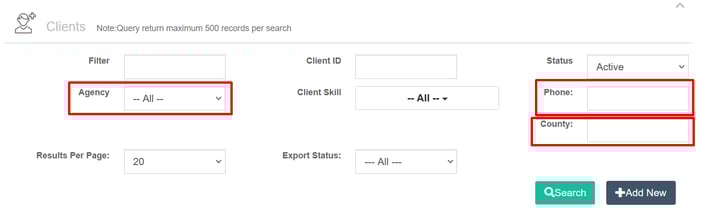
- New Client Search Filters (optional)
- Agency / Payer Descriptor
- Phone#
- County
- Authorization Autoflow - allows users to connect two visit types. Helpful for CDS and private pay company that need to transition from one authorization to another | helpsite.com (optional)
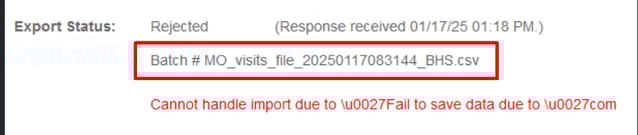
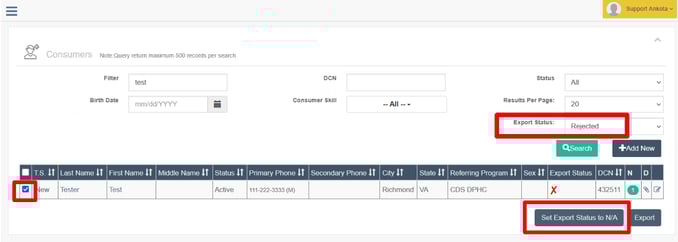
- Set Export to N/A - to solve rejections of client/caregiver/visits that should not have been sent over in the first place, this button will ignore a export and reset status | helpsite.com (optional)
Universal features have automatically been implemented to your environment. Optional features need to be configured by an Ankota specialist. If you'd like any of the optional features added to your system, please contact support@ankota.com. If you see helpsite.com, please click on the link to learn more. Thank you!
January/February 2025
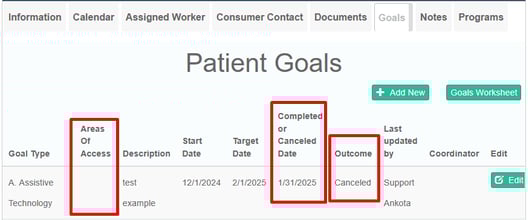
- Client Goals
- Removed required fields for more flexibility
- New Sections
- Areas of Access
- Completed or Canceled Date
- Outcome

- Care Plan Completion Report (universal)
- New Checkboxes - Visit approval Notes
- Caregiver Closure Signature
- Report with Clients on same page contiguous instead of each client on a new page
- Send Login Password to Caregivers - Send text message to caregivers with username and password from the caregiver search page | helpsite.com (universal)
- Show up to 200 Service Notes - before it was showing 20 at a time (universal for those using the tab)
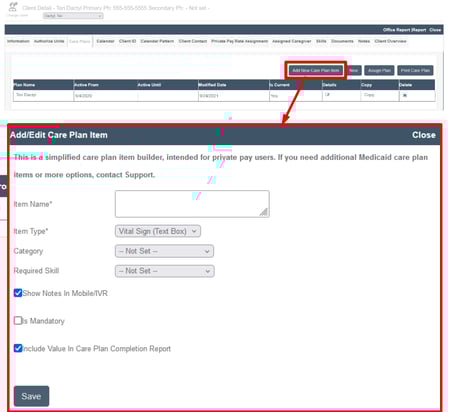
- Custom Care Plan Builder for Private Pay Customers (universal for Private Pay)
Universal features have automatically been implemented to your environment. Optional features need to be configured by an Ankota specialist. If you'd like any of the optional features added to your system, please contact support@ankota.com. If you see helpsite.com, please click on the link to learn more. Thank you!
September/October/November/December 2024 - NEW!
- Adult Day Caregiver Signatures - add caregiver signatures to either client check in or check out options | helpsite.com (optional)
- 835 upload up to 700mb (universal)
- Tool Tips (universal)
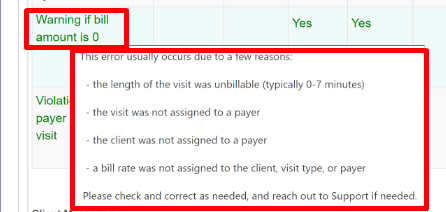
- Violation: warning if bill amount is 0
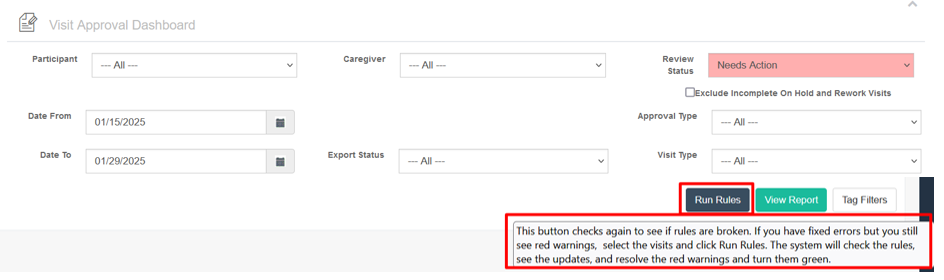
- Run Rules
- Mobile App
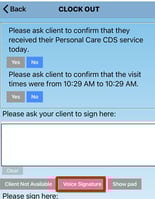
- Client Voice Signature + Visit Confirmation (optional)
- Caregivers must close on-hold visits before starting regular visits (optional)
- Weekly Hours (optional)
- Offline Warning Message (universal)
- On-Hold: Contiguous Visit - Allow caregivers to report a single block for start and end time instead of reporting each visit in contiguous separately (universal)
Universal features have automatically been implemented to your environment. Optional features need to be configured by an Ankota specialist. If you'd like any of the optional features added to your system, please contact support@ankota.com. If you see helpsite.com, please click on the link to learn more. Thank you!
April/May/June/July/August 2024
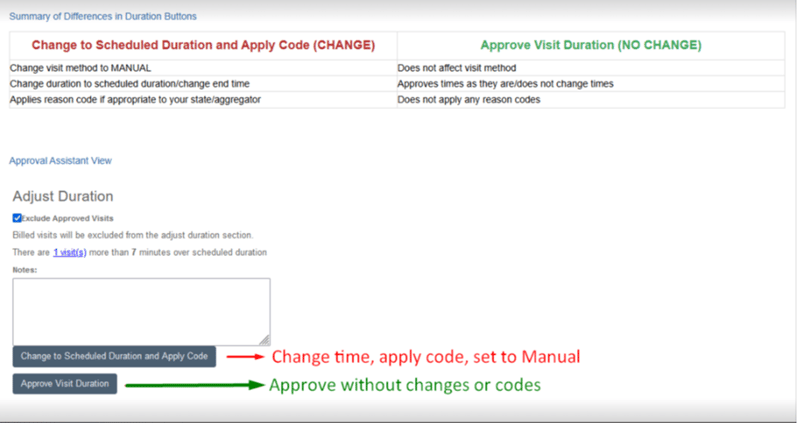
- Approval Assistant - simplified correction process for data entry, approval reason code, duration, and visit approval | helpsite.com (optional)
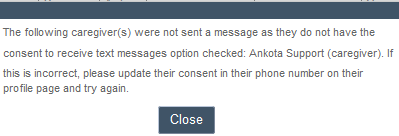
- Consent to Receive Text Messages - if the checkbox is not selected, admin will receive a warning message when sending an SMS message (universal)
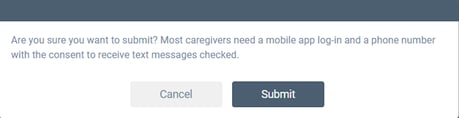
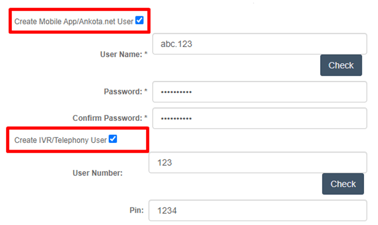
- Caregiver Registration Page - Pop-up warning if admin forgets to check "create mobile app/ankota.net user" and consent to receive text messages | helpsite.com (universal)
- Action Center
- New Section - expiring authorizations even if there is no authorization# (optional)
- HR Requirements + Expiring Authorizations sections do not have limiting date ranges as long as the client/caregiver is active in Ankota | helpsite.com (universal)
- Visit Approval Dashboard
- Faster processing time after clicking search, save, and approve (universal)
- Change defaulted date range from 2 months from current date to custom (optional)
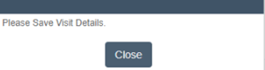
- Pop-up notification reminder to save after making edits (universal)
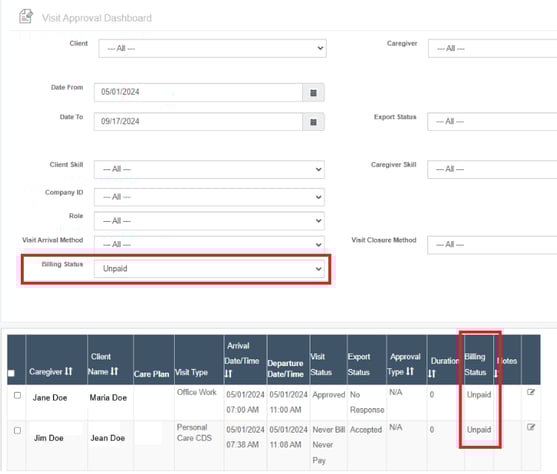
- New Column/filter: Billing Status - 837 paid or unpaid | helpsite.com (optional)
- After you upload your Remittance Advice or 835, response will show on visit detail report (universal)
- Billing Report - The drafts section is now in red text. If there are no invoices in Drafts, the box will disappear completely. Total Dismissed Amount now reporting (universal)
- Mobile App
- Two Factor Authentication - additional security feature on mobile app (not available for telephony / IVR) | helpsite.com (optional)
- Caregivers report cancelled visits | helpsite.com (optional)
- Show Remaining Authorized Hours for the week (optional)
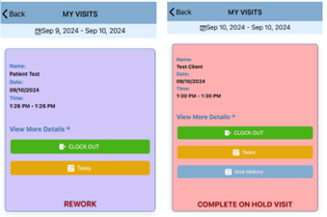
- Rework visits are PURPLE and On-Hold visits are now PINK (universal)
- Require caregivers to complete rework/on-hold visits before scheduled visits (universally turned on, we can turn off upon request)
- Care Plan
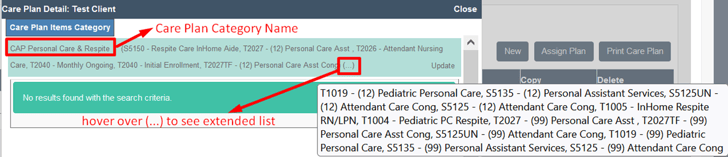
- Shows the visit types assigned to care plan category (universal)
- Increased character count for notes to caregivers | helpsite.com (universal)
Universal features have automatically been implemented to your environment. Optional features need to be configured by an Ankota specialist. If you'd like any of the optional features added to your system, please contact support@ankota.com. If you see helpsite.com, please click on the link to learn more. Thank you!
January/February/March 2024
- Remove DOB on Caregiver Profile (optional)
- Updated Family Access / Authorized Representative Portal - allows authorized representative to email agency and review calendar of closed visits, | helpsite.com (optional)
- VAD violations
- Disregard Duration or Travel / Location Warning on specific visit types - useful for training, office, non-billable, and test visit types (optional)
- Remove unnecessary warnings on Adult Day Facilities (universal)
- Visit with Essential Transportation (optional)
- Errands at Arrival or Departure not at Client Location -- mile limit required | helpsite.com (optional)
- Notify Caregivers of Remaining Authorized Hours - This feature reports remaining weekly authorized hours on Telephony IVR upon clock out... mobile app feature to coming soon | helpsite.com (optional)
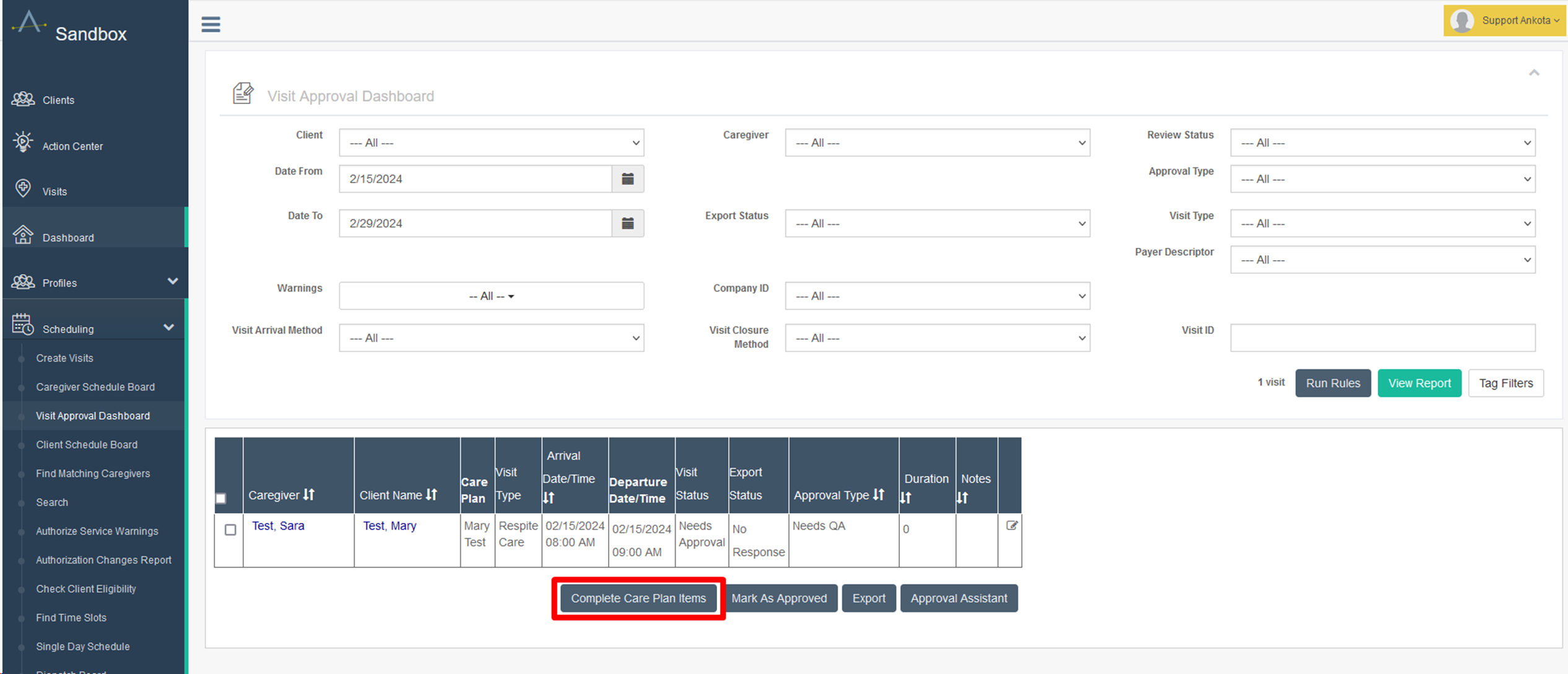
- New Button on VAD: Complete Care Plan Items | helpsite.com (optional)
- Allow caregivers to set BOTH arrival/departure times when closing on-hold visits - Currently, if you have the configuration "allow on-hold visit closing," this feature allows caregivers to change departure time only | helpsite.com (optional)
- Rename Caregiver FCSR Field - Certain states such as PA, MS, IL, and CO require caregiver NPI so we've added an ability to customize field name -- In MO, this field is titled FSCR ID (optional)
- Signature Override - We now offer the option to skip mobile app: client or caregiver signature option for specific visit types | helpsite.com (optional)
- Caregiver Profile Field Name - The outdated names of "create web user" and "create IVR/Mobile User" to "create mobile app/ankota.net user" and "Create IVR/Telephony User" (universal)
Universal features have automatically been implemented to your environment. Optional features need to be configured by an Ankota specialist. If you'd like any of the optional features added to your system, please contact support@ankota.com. If you see helpsite.com, please click on the link to learn more. Thank you!
November/December 2023
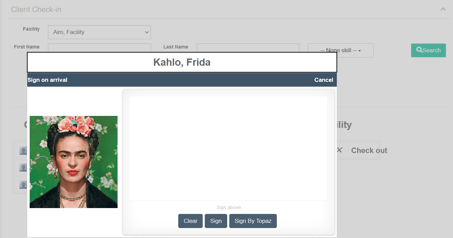
- ADHC: Photo ID on Client Check-in Screen (universal)
- Review Status: Never Bill Never Pay on VAD - new status dropdown option on the visit approval dashboard (universal)
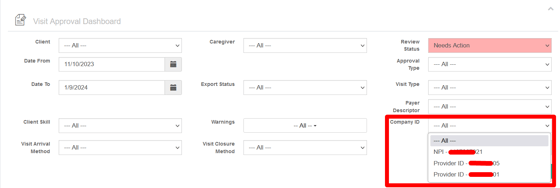
- Filter: Company IDs on VAD - new filter titled company ID that shows NPI or Medicaid Provider ID on the visit approval dashboard (optional, already added for Medicaid companies)
- Missed Visits are not asked on IVR - with this configuration, caregivers will only be asked about scheduled visits on IVR. Missed visits and rework visits will still show on the mobile app for completion (optional)
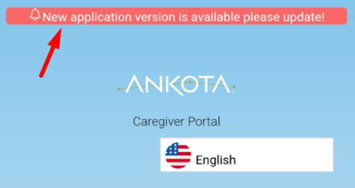
- Caregiver Mobile App - Pop up notification when there is a new version available (universal)
Universal features have automatically been implemented to your environment. Optional features need to be configured by an Ankota specialist. If you'd like any of the optional features added to your system, please contact support@ankota.com. If you see helpsite.com, please click on the link to learn more. Thank you!
August/September/October 2023
- Violation: No Client Signature Warning will not show for IVR visits (universal)
- Violation: Essential Transportation / Errand at Arrival or Departure not at Client Location | helpsite.com (optional)
- Contiguous Visit NO SHOW - when the first contiguous visit is set to NO SHOW, both visits are automatically set to NO SHOW (universal if you already had this feature, please email support if you'd like this feature added)
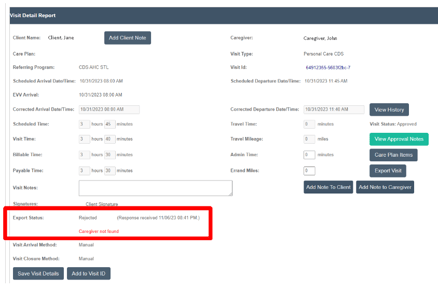
- Timestamps on Aggregator Export Responses - ex: Accepted/Rejected (response received date and time). This update allows you to confirm visit have been exported successfully, and your responses are up to date (universal)
- New Features added to several reports (universal)
- Skill filter on Caregiver Hours Report
- SSN field in Caregiver Report
- Skill filter on Workflow Wizard Dashboard
- Option to add Care Plan Responses on the Care Plan Completion Report (ex: complete, not needed, text fill etc.) | helpsite.com
- Upload Photo from Phone Gallery - previously, you could only take pictures (universal)
- Increased Visit Type Name Character Limit (universal)
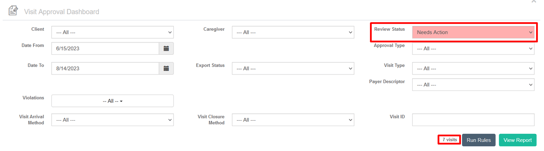
- VAD: Pink Needs Action + Visit Count (universal)
- Ban Caregiver/Client - Prevent caregiver form being assigned to a client. Now moved to the main client profile | helpsite.com (universal if you already had this feature, please email support if you'd like this feature added)
- Care Plan Item Text Responses available for ADHC (universal)
- Search by Visit ID only - When you search by Visit ID on the visit approval dashboard, all other filter fields will be ignored. This prevents errors such as incorrect date range, status, or extraneous spaces (universal)
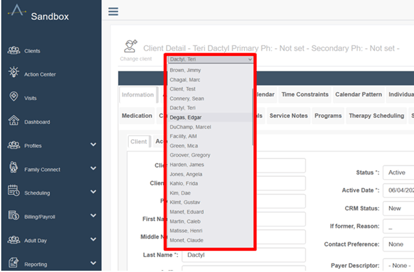
- Expanded Client/Caregiver Dropdown List to 1,000 - previously, the limit was 50 (universal if you already had this feature, please email support if you'd like this feature added)
Universal features have automatically been implemented to your environment. Optional features need to be configured by an Ankota specialist. If you'd like any of the optional features added to your system, please contact support@ankota.com. If you see helpsite.com, please click on the link to learn more. Thank you!
April/May/June/July 2023
- Address 2 - now labeled Address 2 (Unit, Condo, Apt., Suite etc.) for clarity and pop-up warning appears during registration if entered in Address 1 (universal)
- Rework Date Range - currently, the default to send rework is the past 14days from the current date, but now you can customize the date range (optional)
- New Filters on the Authorized vs. Delivered Report- Two new filters available: Search by quarter and agency/referring program | helpsite.com (universal)
- Office Shift with Multiple Client Clock in/out - This function allows caregivers to be clocked into multiple clients at the same time without being schedule and/or clocked into an office shift | helpsite.com (optional)
- Overwrite Clock Type (Report Arrival only or Departure only) - Companies that want caregivers to clock in only or clock out only on specified visit categories | helpsite.com (optional)
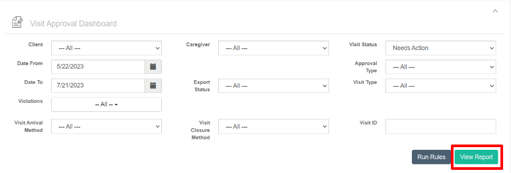
- Most Used Buttons highlighted in Turquoise (universal)
- Billing Report - View Report Button
- Visits Page - Search Button
- Caregiver/Client/Staff Search Screen - Search Button
- Visit Approval Dashboard - View Report Button + Approve Visit Button
- Authorized Service Warning - Refresh Button
- Manually Adjust Visit Screen - Search Button
- New Violation - The violation "visit duration +/- __ minutes from scheduled duration" is now split to over or under the scheduled duration. Please contact Ankota Support to add/remove one or both violation configurations. We will leave if we are not contacted. (optional)
- Caregiver ID on Payroll Report (universal)
Universal features have automatically been implemented to your environment. Optional features need to be configured by an Ankota specialist. If you'd like any of the optional features added to your system, please contact support@ankota.com. If you see helpsite.com, please click on the link to learn more. Thank you!
March 2023
- Caregiver/Client Folder Visibility - block folder view based on user roles | helpsite.com (universal)
- Upload Required Caregiver Documents - Employees can upload certificates or credentials) via the mobile app | helpsite.com (optional)
Adult Day Improvements
- Updated activity management page | helpsite.com (universal)
- Auto-close arrived visits after the scheduled duration or specific standard duration | helpsite.com (optional)
- Ability to add a note/reminder to the check-in screen | helpsite.com (optional)
- Schedule limitation pop-up warning based on client's authorization and time constraints | helpsite.com (optional)
Universal features have automatically been implemented to your environment. Optional features need to be configured by an Ankota specialist. If you'd like any of the optional features added to your system, please contact support@ankota.com. If you see helpsite.com, please click on the link to learn more. Thank you!
February 2023
- Contact Preferences added to the Client Census Report - Column R - You can find contact preference on the client's information tab
- On Hold Manual Closure by Caregiver - This config sends a text notification for late departures. Previously, we only had one for late arrivals. All customers who had the late arrival text configured, has automatically been updated with late departure text. | helpsite.com (optional)
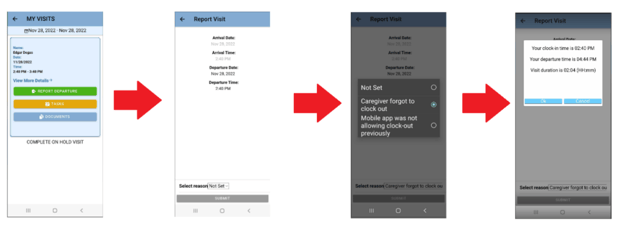
- Visit Approval Dashboard's new status listing - a status of Passed Screening with a type Under Review means the visit closure has not automatically passed all checks. You must rerun rules to finish closing our visits for billing/payroll (universal)

- New Filters on Report Printout - For organizations that use nurse signatures to verify visit completion, we've added two new filters -- 1. Only Show visits without nurse signatures and 2. Only show approved Visits and a column of the date the nurse signed using the include Nurse Signature checkbox. (optional)

Universal features have automatically been implemented to your environment. Optional features need to be configured by an Ankota specialist. If you'd like any of the optional features added to your system, please contact support@ankota.com. If you see helpsite.com, please click on the link to learn more. Thank you!
January 2023
- Late Text Departure to Admin/Caregivers - This config sends a text notification for late departures. Previously, we only had one for late arrivals. All customers who had the late arrival text configured has automatically been updated to include the late departure text config | helpsite.com (optional)
- Only allow one caregiver to clock-in - This config prevents caregivers from clocking in if another caregiver has not clocked out yet. This feature is helpful for companies that provide 24hr or contiguous services with different caregivers. (optional)
- AR Screen updates every 15min - Previously, the AR screen updated very shortly after payments were made. Now, the page will update only once every 15mins. This change has significantly improved the speed of your system. (universal)
Universal features have automatically been implemented to your environment. Optional features need to be configured by an Ankota specialist. If you'd like any of the optional features added to your system, please contact support@ankota.com. If you see helpsite.com, please click on the link to learn more. Thank you!
October + November 2022
- Hospitalization Report - shows clients without a hospitalization end date. Now indicated with a blank space (universal)
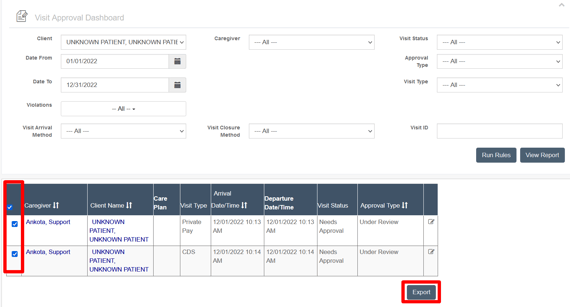
- Visit Mass Export Button - This button on the VAD allows users to resend a group of visits rather than export one visit at a time. This allows customers that do not bill through Ankota or their aggregator to export EVV data | helpsite.com (optional, but already configured for all HHAx/Sandata/Tellus users)
- Split Visit at Midnight (for billing purposes) - If a schedule visit passes midnight, Ankota will split the visit into two for billing purposes. Example: Original visit is scheduled for 11p to 7am > When you calculate the visit, it will now split and reflect two visits: 11p-12a and 12a-7a | helpsite.com (optional)
- Visit Data Warehouse Report - EVV arrival method is documented in column AN titled "opened from" (universal)
- Default Care Plan Responses to Complete - Currently, the care plan item response is defaulted to "not set". This feature defaults care plan item responses to complete. This only works for the mobile app/browser login and if you have "complete" as a response option -- available for Private Pay (optional)
Universal features have automatically been implemented to your environment. Optional features need to be configured by an Ankota specialist. If you'd like any of the optional features added to your system, please contact support@ankota.com. If you see helpsite.com, please click on the link to learn more. Thank you!
October 10, 2022 - Mobile App Release
- New Available Shift Option - Only show client's first name, last initial, and city (as opposed to complete address)
- One-Click Open for Care Plan Items History
- Improved Offline Performance - Large care plans item upload when synced to the internet
- Improved Password Management - Caregivers were receiving "offline error" when they entered old passwords
- Missed Punch Forms - caregiver will not be able to select arrival beyond 21days of current date + departure beyond the current date. When selecting the arrival date, the departure date will automatically match to avoid entry error
September 2022
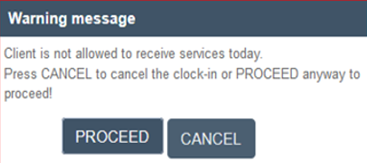
- Ability to check for Active Authorization with remaining units for clients and block clock-in if conditions are not met (optional)
- Add URL to Ankota - You can now add a link to your organization's website and/or other external data programs systems (optional)
- Select All option on the client search page (universal)
- EVV Timesheet / Care Plan Completion Report - New name! Originally, this report was titled "Care Plan Completion." | helpsite.com (universal)
If you'd like any of the optional features added to your system, please contact support@ankota.com. If you see helpsite.com, please click on the link to learn more.
August 2022
- Client Report - added finance ID column (universal)
- Caregiver Report - Added pay rate column (universal)
- Google Maps Improvements on Visit Approval Dashboard - Optimized to show display points instead of having to zoom in and out to see area of interest. 0= client, 1=arrival coordinates, 2=departure coordinates | helpsite.com (universal)
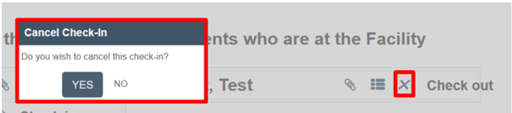
- Adult Day Client Check-in cancellation option - visit will change to cancelled (grey) on the schedule board | helpsite.com (optional)
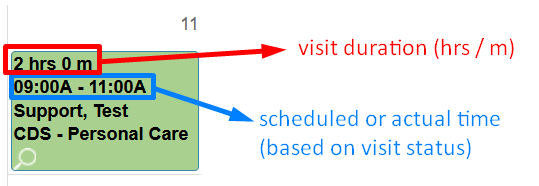
- Visit Durations on the schedule Board - If you prefer to see scheduled/actual time AND the duration, please use the helpsite article to configure | helpsite.com (optional)
- Client Export Button - Aggregators like HHAx and Sandata require a separate caregiver/client file. Every time a new client is added, please select and export. | helpsite.com (Added to all Missouri clients)
- Sandata Export DOB + Memo Adjustment - The Missouri state export of visit data now includes the client's date of birth and a longer memo field that includes any reason coding on the visit. The DOB is a requirement starting 10/5/2022. Visit memo is required for all DDD visit programs. | helpsite.com (Added to all Missouri clients)
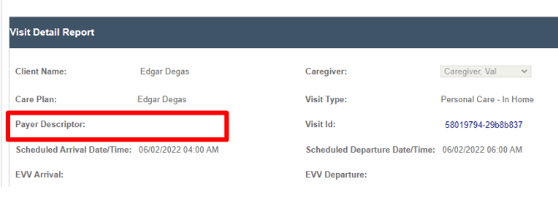
- Payer Descriptor on Visit Approval Dashboard - For customers that use payer descriptors (sometimes known as Agencies or Referring Parties), this will help identify missing or wrong descriptors | helpsite.com (universal)
- Guest Workers in Sub-departments - For organizations that have multiple departments, you may have employees who work at varying levels or locations. This identifiable text marks "guest worker" (or copied profile). Edits can only be made in the original profile (oftentimes at the parent level) | helpsite.com (universal)

If you'd like any of the optional features added to your system, please contact support@ankota.com. If you see helpsite.com, please click on the link to learn more.
July 2022
- Flashing Chat Notification - When caregivers responds to a chat message, a yellow flashing pop-up shows on the top right corner on the Caregiver Schedule Board with a a message "You have unread chat messages". If there is only one open chat; admin can click on the flashing and it will take you to the caregiver's chat bubble. If there are multiple messages or open chats, please scroll and look for flashing yellow chat bubbles. Once all messages are read, the flashing notification will disappear. | helpsite.com (optional)
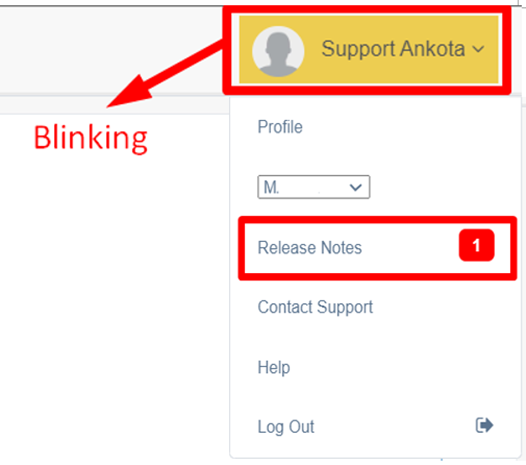
- Flashing Release Notes Notification - When there is an update in Ankota (system slowness, new development releases, etc.), you will be notified when you log into Ankota. When you click the release notes section, your profile name will no longer blink. We hope this improvement will help disperse information to you as quickly as possible. (universal)
- Visit Type Category/Payer Filter on Calculate Billing/Payroll
If you'd like any of the optional features added to your system, please contact support@ankota.com. If you see helpsite.com, please click on the link to learn more.
June 2022
- Ionic Document Section - New configuration to show documents for assigned clients scheduled for the same day under MYVISITS. For example, if a caregiver is assigned to 5 clients for each day of the week, the caregiver will only see Monday's client in the section (optional)
- New Report - Clients with Assigned Providers - This report includes Client Name, Client ID, Caregiver Name, Caregiver ID, and visit type (optional)
- Override Care Code - This is helpful If you have various emergency or bonus rates you'd like to send out or attach to a visit (optional)
- Available Shifts - Added new statuses to be visible in ionic (pending, booked, committed, unassigned). This allows for improved organization of unassigned visits on the schedule board. (universal)
- 2nd address geo-fencing | helpsite.com (universal)
- Additional status functioning in available shift feature (universal)
- Re-aligned pop-up pages: Calendar, client/caregiver schedule board, and visits page, (universal)
- AR Screen - Posting Write offs | helpsite.com (universal)
- New System Warnings on VAD | helpsite.com(optional)
- Violation - Missing Worker ID
- Violation - Missing Worker code
- Violation - Missing Admission ID on Authorization
- Violation - Missing Payer Descriptor on Visit
- New Run Rules added to the VAD | helpsite.com (universal)
If you'd like any of the optional features added to your system, please contact support@ankota.com. If you see helpsite.com, please click on the link to learn more.
May 2022
- Ionic - Worker can access Client's visit history (who was working before/after) (optional)
- Ability to delete on Notes tab (optional)
- Tellus - Resubmit individual claims | helpsite.com (universal)
- Mark visit as an employee shift on the calendar | helpsite.com (optional)
- Sandata/HHAx - Caregiver Export Button | helpsite.com (optional)
If you'd like any of the optional features added to your system, please contact support@ankota.com. If you see helpsite.com, please click on the link to learn more.
April 28, 2022
- UX - client/caregiver schedule board tab pop-up (editable via mobile device) (universal)
- Client/caregiver schedule board tab - 24hr view (universal)
- Languages Added - simplified Chinese, Cantonese and Mandarin (universal)
- Availability Change will send details to action/requests page (optional)
If you'd like any of the optional features added to your system, please contact support@ankota.com. If you see helpsite.com, please click on the link to learn more.
April 2022 - Mobile App Release
- Available Shifts Function: We've added an "available shifts" function that lets caregivers express interest in or in some cases accept open shifts without you having to schedule them. To configure this feature and get trained, please reach out to Ankota Support.
- Support for both "Shifts" and "Visits" Some Ankota customers have their staff work shifts (e.g., they're paid for an 8 hour shift) and also perform specific client visits within their shifts. This enhancement enables that capability so that you can pay for shifts and also gather EVV information for individual visits.
- Map Choices: The app formerly used Google Maps exclusively and now gives user's the choice of a number of map services. This is especially designed for iPhone Users who prefer Apple Maps, but also allows alternate choices (like WAZE) for Android users.
- Enhancements to Work Offline and Work "with few bars:" We've made substantial improvements so that caregivers working in rural areas with bad mobile coverage to clock in and out successfully and consistently. While "work offline" has been very reliable, some caregivers have struggled when there's "1 bar."
- Secure Logging: We've improved our ability to diagnose app issues by adding logging into the app.
April 14, 2022
- Open Availability Function (optional)
- Mobile App - Select Apple or Google maps (universal)
- Charge maximum billing/payroll for no show shifts (optional)
- New Master Contact Relationship Types | helpsite.com (optional)
- Service Coordinator, Conservator, IHHS, ILS/SLS Provider, Job Coach, DOR Counselor, FMS Provider, Independent Facilitator
- Visit Detail - Block clock-out time before clock-in time
- Visit Detail - Overlap Violation warning pop up.
If you'd like any of the optional features added to your system, please contact support@ankota.com. If you see helpsite.com, please click on the link to learn more.
March 2022
If you'd like any of the optional features added to your system, please contact support@ankota.com. If you see helpsite.com, please click on the link to learn more.
February 2022
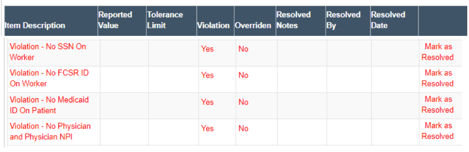
- New Error Prevention Violation Warnings for Missing Data (optional)
- No SS on Worker
- No FCSR ID
- No Medicaid ID on patient
- No Physician and Physician NPI
- Clock in/out on different methods
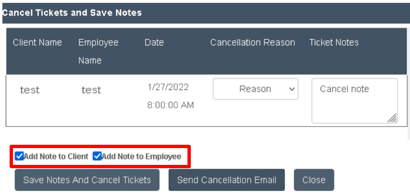
- Add cancelled visit notes to caregiver or client's page (universal)
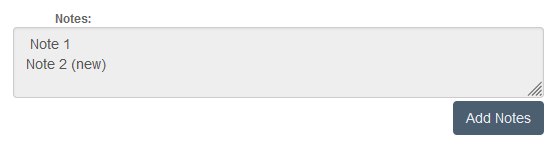
- Add Notes Button - Lock old note (can't edit) and add new. (universal)
- Split billing invoice by day (optional)
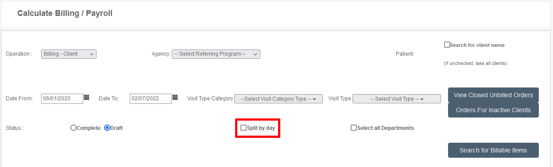
- Add nurse signatures to Ankota Private Pay forms (optional)
- Batch Scheduling Capabilities - send late arrival or departure texts and/or emails to admin/office (optional)
- Improvements to billing invoice speed (universal)
If you'd like any of the optional features added to your system, please contact support@ankota.com.
January 2022
If you'd like any of the optional features added to your system, please contact support@ankota.com.
--------
December 16 2021: Sprint Release Notes
The following enhancements and improvements will be released on 12.16.2021
- Enhancements to expirations dates in archiving HR requirements
- Closed visits report - skill filter added
- Notes column added for emails in client file
- Improvements to client calendar for finding workers with no schedule
For any configurations, please contact support@ankota.com.
December 2 2021: Sprint Release Notes
The following enhancements and improvements will be released on 12.02.2021
- Continued Batch billing improvements
- Ankota Care giver app
- Continued improvements for low band width / off line
- Notes column added for emails in client file
- Missouri Customers:
- FCSR field added to caregiver report
- Sandata reason codes added
For any configurations, please contact support@ankota.com.
November 11 2021: Sprint Release Notes
The following enhancements and improvements will be released on 9.30.2021
- Continued Batch billing improvements
- Ankota Care giver app
- Continued improvements for low band width / off line
- Notes column added for emails in client file
- Missouri Customers:
- FCSR field added to caregiver report
- Sandata reason codes added
For any configurations, please contact support@ankota.com.
October 21 2021: Sprint Release Notes
The following enhancements and improvements will be released on 9.30.2021
- Configurable: Visit Approval Dashboard filter for "visit arrived by" and "visit closed by"
- EVV Audit report - "arrival distance" and "departure distance" added
- Ankota Caregiver App continued improvements
- continued low bandwidth improvements
- ask "are you sure" when reset password is pressed
For any configurations, please contact support@ankota.com.
October 7 2021: Sprint Release Notes
The following enhancements and improvements will be released on 10.07.2021
- Visit page, add "duration" to set date and time" function"
- Client details - enter date range for when diagnosis code is active
- Ankota Caregiver App Improvements
- Increase file upload size to 5MB
- Full screen signature area
- Ability to disable availability
For any configurations, please contact support@ankota.com.
September 30 2021: Sprint Release Notes
The following enhancements and improvements will be released on 9.30.2021
- Visit page, add "duration" to set date and time" function"
- Client Census report - new columns for SSN, Medicaid ID, and Client Skills
- Add a confirmation when reset password is pressed on caregiver app
- Configurable - add history of notes on the last 7 days for a care plan item
For any configurations, please contact support@ankota.com.
September 16 2021: Sprint Release Notes
The following enhancements and improvements will be released on 9.16.2021
- Ankota caregiver app low bandwidth improvement
- Configurable FCSR ID field (MO clients)
- Visit type setting to not count hours towards OT
For any configurations, please contact support@ankota.com.
September 2 2021: Sprint Release Notes
The following enhancements and improvements will be released on 9.02.2021
- Continued Batch billing speed improvements.
- New approval status "under review" on Visit Approval Dashboard
- Ability to select multiple visit types on billing report
- Ability to search for invoices using both visit dates and payroll date
For any configurations, please contact support@ankota.com.
August 19 2021: Sprint Release Notes
The following enhancements and improvements will be released on 8.19.2021
- Continued Batch billing speed improvements.
- Client Authorization show on calendar/schedule board
- Configurable on visit type: "do not count hours towards over time" setting
- Configurable: on multi select on payroll report include worker ID
For any configurations, please contact support@ankota.com.
August 5 2021: Sprint Release Notes
The following enhancements and improvements will be released on 8.5.2021
- Continued Batch billing speed improvements.
- "Tags" added to calculate payroll and payroll report
- Scroll added to approval reasons on Visit Approval Dashboard
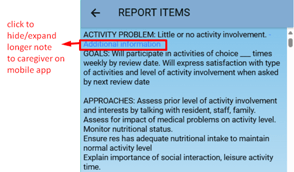
- Configurable item to show all notes and info only items on mobile app
- Configurable item to see contiguous visit details on mobile app
July 22 2021: Sprint Release Notes
The following enhancements and improvements will be released on 7.22.2021
- Continued Batch billing speed improvements.
- Multi-select on Payroll Report
- Configurable item to allow action center messages to be sent to a "role"
- Role and Agency filter added to Visit Approval Dashboard
June 10 2021: Sprint Release Notes
The following enhancements and improvements were released on 6.10.2021
- Batch billing speed improvements.
- Ankota Caregiver Mobile App:
- Face id bug fix
- Language improvements
- Expense reporting capability
May 27 2021: Sprint Release Notes
The following enhancements and improvements were released on 5.27.2021
- Care plan item category added to the Visit Printout.
- Speed improvement for billing/payroll calculation.
- Beginning build-out for Authorized vs. Delivered dashboard.
- Ankota Caregiver Mobile App:
- GPS Warning improvements
- Speed improvement on the notification screen
- Multiple languages including Spanish, Korean, Russian, Gujarati, Hindi, and Vietnamese.
April 28 2021: Sprint Release Notes
The following enhancements and improvements was released on 4.28.2021
April 15 2021: Sprint Release Notes
The following enhancements and improvements were released on 4.15.2021
- Improvement: When a worker becomes former keep the assigned worker id.
- When you add "bill to payer" you will be offered the option to transfer the balances to the new payer.
- Invoice Notes are being added to the AR Report
- Adding authorized and delivered information on the client calendar
- Visit Approval Dashboard warning for no care plan items
- Ankota Caregiver Mobile App:
- Chat improvements
- Document improvements
April 1 2021: Sprint Release Notes
The following enhancements and improvements was released on 4.1.2021
- Improvement to the weekly authorization vs delivered report. Contact support at support@ankota.com to have this report configured in your Report View.
- Calendar-based scheduling improvements: the screen will scroll down to the repeating section and a "select all 7 days" option will be available.
- A new care code will be available to notify of daily overtime violations.
- Bug fix to the missing "one visit or all the visits" when clicking on a visit to edit on the schedule board.
- Ankota Caregiver Mobile App:
- Completion of the process documents function
- Beta Spanish version of the Ankota Caregiver Mobile App
March 18 2021: Sprint Release Notes
The following enhancements and improvements were released on 3.18.2021
- Partial Holiday fix
- Calculating Billing with former clients bug fix
- Ankota Caregiver enhancements
- Improvements made to the "forgot password" function
- Address 2 (Apartment number) now visible
- Better communication with GPS capture
- Payroll Section to now state "Gross Payroll" vs "Payroll"
- Improvements to the rework function
March 4 2021: Sprint Release Notes
The following enhancements and improvements were released on 3.4.2021
- Violations Filter added on the Visit Approval Dashboard.
- Show "how many times" a care plan item has been done on visits screen.
- Upload files up to 10 MB (increased from 5 MB) in a specific folder in a client or caregiver document tab.
- In the caregivers roles, when assigned to a client, click on the client's name will open the client's record in a new tab.
- AR adjustment enhancement - can create custom manually adjust write off types.
- Ankota Caregiver App improvements.
February 18 2021: Sprint Release Notes
The following enhancements and improvements will be released on 2.18.2021
- On the worker's calendar you will now be able to click and open a magnifying glass when in the day and week view.
- On the Ankota Caregiver Mobile App the caregiver will now see their week's total hours at the top of the home screen plus a customizable date range in the Visit History tab.
- On the Ankota Caregiver Mobile App when a visit crosses midnight it will no longer show "All Day" but will now show the times for the visit.
- Fix on the Visit Approval Dashboard resolve button - when resolving an error for a visit, the note will remain after the visit is approved.
February 4 2021: Sprint Release Notes
The following enhancements and improvements were released on 2.4.2021
- Add the ability to show client and worker signatures from the mobile on the the Visit Approval Dashboard.
- When creating visits, "Ongoing" has been removed so that visits are created with a clear end date.
- When visits are created in Calendar Based Scheduling - a new alert for checking overlaps is now available.
- Improvements to the geofencing coordinates on the Visit Data Warehouse when the client has more than one address configured in their profile.
- A new summary of units has been added to the Authorized Units tab without having to enter the edit screen.
January 21 2021: Sprint Release Notes
The following enhancements and improvements were released on 1.21.2021
- Ankota Caregiver App improvements including facial recognition and finger print sign on.
- We have added sortable filters on the Client Search page for better functionality to the client search page.
- We will no longer be showing overlaps for visits that are scheduled by duration (like Consumer Directed Services)- this will have better vision on issues that are real overlaps on the Caregivers Schedule Board.
- For the hospitalization tab, we have removed the mandatory field of the hospitalization end date. This will allow the user to enter an open ended hospitalization date.
January 7 2021: Sprint Release Notes
The following enhancements and improvements were released on 1.7.2021
- Fix was made for partial holidays for billing purpose to allow half day holidays.
- We have added the ability to sort columns on the Visit Approval Dashboard for more accessibility for this feature.
- When you are on the AR Screen and you click on a clients name, you will now see the client's Accounts Receivable open in a new tab so that you have easy access to return to the AR Screen to move to the next client.
December 17 2020: Sprint Release Notes
The following enhancements and improvements were released on 12.17.2020
- This sprint was dedicated to bug fixes.
December 3 2020: Sprint Release Notes
The following enhancements and improvements were released on 12.3.2020
- We have simplified the create Care Plan function. Now, when clicking "New" the following options will be the only options as the settings. It also defaults the name of the client, making care plan creation a breeze.
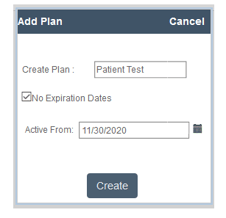
- Time zone has been moved from the Configuration tab to the main client information tab for ease of access and entry.
- Support fixes made to reporting and batch scheduling.
For any questions, please contact support@ankota.com.
November 12 2020: Sprint Release Notes
The following enhancements and improvements were released on 11.12.2020.
- New configurable feature to not allow late clock in on IVR or app.
- Improvements to the Ankota Caregiver App as follows:
- Text boxes are bigger when reporting notes on care plan items
- More accurate Geofence and improvements to the GPS including the missing GPS coordinates on arrival
- When the office closes a visit manually, the Visit Approval Dashboard method will now say Timesheet.
- Adjusted the box size on the mailing labels report for better printing experience.
For any configuration requests or questions, please contact support@ankota.com.
October 29 2020: Sprint Release Notes
The following enhancements and improvements were released on 10.29.2020.
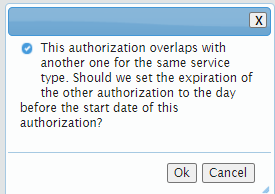
- We have implemented an enhancement to the authorization screen. If you add an authorization that overlaps with another authorization of the same visit type, there will be an option to auto end the old authorization to end the day prior to the new one. This means that you will no longer have manual interventions to prevent overlapping authorizations.
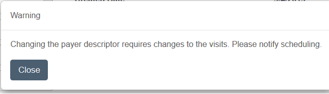
- If you work with our Payer Descriptors (popular in the state of VA), you might need to often change the payer descriptor. We now have a configurable setting that if you change the payer descriptor, a pop up will appear. saying "Changing the Payer Descriptor requires changes tot he visits. Please notify scheduling". Contact support@ankota.com to have this report configured for you.
- Accounts Receivable Screen update - You are now able to add AR notes directly from the Accounts Receivable screen. When you save a note on a particular invoice, the note will appear in the history section.
- We had a bug with the Mailing Labels report which was fixed on this sprint.
- The Visit Approval Dashboard (previously called the Visit Closure Report) and the Visits page will now show end times as XX:XX if the time has not been reported.
September 17 2020: Sprint Release Notes
The following enhancements and improvements were released on 9.17.2020.
- NOTICE OF SCREEN CHANGE FOR ALL ADMINS/SCHEDULERS: Per many of our customer's request, we have now separated the Admin staff from the Worker/Caregiver staff search screens. Instead of having all users under the worker/caregiver search, you will now have two menu items and will see the following change.
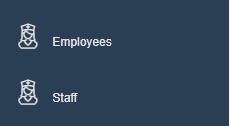
*Note: If your workers are listed at Caregivers, then Employee's will say Caregivers instead.
- Bug fix: when adding a note on the Visits screen, if you clicked on cancel the message box didn't go away. This has been fixed.
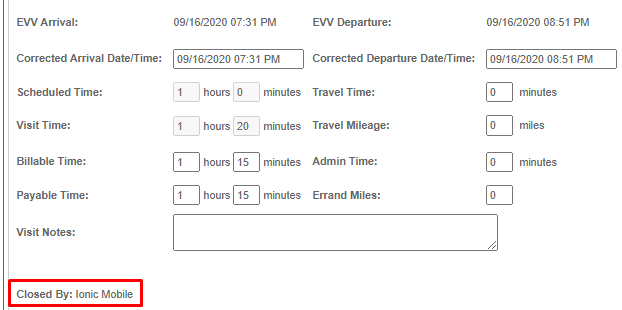
- In the Visit Detail Report (found by clicking on the magnifying glass or going to the Visit Approval Dashboard), you will now see how the visit was closed by:
- New Care Plan Item report inspired by one of our customers will be releasing on 9.18.20. This report will be a condensed version of the Report Printout. Contact support@ankota.com to have this report configured for you.
September 3 2020: Sprint Release Notes
The following enhancements and improvements were released on 9.3.2020.
- Ankota Caregiver mobile app - while collecting signatures on a visit, the notes will now appear before the signatures on the Ankota Caregiver Mobile app. This change was made so that the client can see the visit notes before signing.
- The Visit Approval Dashboard continues to become more and more powerful. In this sprint, we have added a configurable item to update care plan items from this screen. To have this feature turned on for your team, please contact support@ankota.com.
- Another user experience item that was deployed is found in the Action Center-Expiring Authorization section. Prior to today if an authorization expired and there was another authorization in the client's record we were showing the client as having an expiring authorization. Now, if the client has another authorization that is immediately after the expiring authorization, they will not appear in the Action Center-Expiring Authorization section.
- We have improved the speed of processing payroll.
- If your agency uses multiple admin templates, we can now configure the template type in the main caregiver's information page and can remove the configuration tab for the appropriate admin. To have this feature turned on for your team, please contact support@ankota.com.
August 20 2020: Sprint Release Notes
This sprint was dedicated to bug fixes and speed enhancement. There are no new develop items to report at this time.
July 31 2020: Sprint Release Notes
The following enhancements and improvements were released on 7.31.2020
- Ankota Caregiver Mobile App: Improvements to offline mobile GPS coordinates. This improvement will allow better accuracy on GPS when using the mobile app in offline mode. (releasing on 8.4.2020)
- Calendar Based Scheduling Improvements
- When creating a pattern starting on a day other than today the start date will now default to the date selected instead of today's date.
- If a client has a dash in their name, we were only pulling the first part of the last name and not the first name, this has been fixed now and the full name will show when there is a dash
- When a client is made former, we will now "release" the caregiver from the assignment so the caregiver's assignments will only show active clients
July 23 2020: Sprint Release Notes
The following items are in development and most are set to be released on 7.23.2020. They include the following:
- We will now be including "Sprint Update" in your environment. This page will continuously be updated and can be viewed by going to the upper right corner of your environment, clicking on your profile, and selecting "Release Notes" (completed)
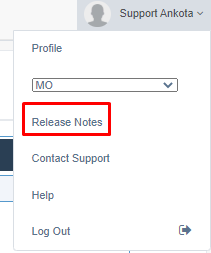
- You will also see another feature "Contact Support." This will allow you quick access to send an email to our support team with any issues you make encounter. (completed)
- On the new Ankota Caregiver mobile app, it has been requested to show the duration on the visit history. This will be displayed in the Visit History tab next to the time. (in progress)
- In the report "Visit Data Warehouse", you will see another column labeled "Notes." Along with the robust visit information, you will have access to the visit notes in this report. (available 7.23.20)
- We are working to increase the document attachment size from 5MB to 10MB (in progress)
- The Visit Approval Dashboard will now accommodate more than one visit approval reason (in progress)