
Adult Day Care Activity Ideas to Keep Clients Engaged
Adult day care centers provide a vital service, offering a ...

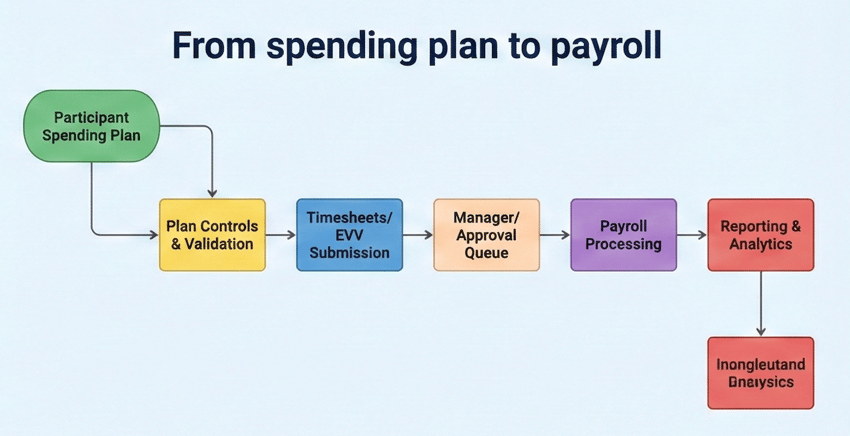
If you're doing a self-direction FMS software comparison, don't compare platforms by features on a slide — compare them by controls and workflow resilience: spending plan enforcement, EVV-ready time capture, payroll and tax workflows, exception queues, audit trails, and reporting. CMS guidance on budget authority emphasizes participant control and the operational responsibility that comes with it, and your software must make that control safe, trackable, and audit-ready. Ankota's self-direction FMS software is built for exactly that reality — connecting budgets, EVV, worker onboarding, approvals, claims, and ERA in one platform so your team isn't the integration layer. This guide gives you a five-capability comparison framework, a three-layer scoring model, a seven-scenario demo script, and the common pitfalls worth avoiding before you sign anything.
Why Comparing by Features Leads You to the Wrong PlatformA lot of organizations make the same mistake when comparing self-direction FMS software. They watch demos, collect feature lists, and pick the platform that looks the most polished. The problem is that self-direction programs don't succeed because software looks good. They succeed — or fail — based on how software holds up under the daily pressure that doesn't show up in a vendor demo: budgets that must be enforced and explained in real time, timesheets that arrive late or incomplete, EVV exceptions that need routing and resolution, payroll deadlines that don't move, state reporting requirements that change mid-year, and audits that require clean, assembled proof of every decision and approval.
A portal that can't enforce spending rules is a future compliance problem wearing a clean interface. A system that handles payroll in one module and budget tracking in another, with no structural connection between them, makes your staff the integration layer. And a platform that logs incidents after the fact without surfacing them while there's still time to act isn't protecting your program — it's just documenting what went wrong.
The comparison framework in this guide is built around those operational realities, not around feature checklist length. If you want broader context on what FMS organizations actually do before getting into software evaluation, our guide to fiscal intermediary roles and responsibilities covers the operational foundation that makes software decisions make sense.
CMS's guidance on budget authority describes programs where participants may choose fewer hours at higher pay rates, exercise control over service mix, and otherwise direct how their authorized dollars are spent. That flexibility is the design intent of self-direction. But it significantly increases the operational responsibility of the FMS organization, because the flexibility has to stay within the boundaries of an approved service plan, and the software has to make that enforcement automatic rather than dependent on staff catching violations manually.
In practice, that means real-time budget balance visibility for the right stakeholders — participant or authorized representative, support broker or case manager, and internal operations staff — with controls that prevent approvals exceeding the plan and alerts that surface burn-rate risk early enough to act on. MACPAC's guidance on FMS agencies is explicit that monitoring for funds being expended too rapidly or underused is a core FMS responsibility. A platform that surfaces a budget problem in a monthly report is fundamentally different from a platform that flags it in real time. Both process the same data. Only one of them gives you time to respond.
Documentation linkage matters just as much. Every payment needs to be traceable back to an approved service plan, a completed timesheet or EVV record, an authorization, and an approval chain. If those records live in separate systems and someone has to assemble them manually when a reviewer asks, you have a structural audit risk regardless of whether the underlying services were delivered correctly. This is one of the core challenges we cover in 5 Big Challenges in Self-Directed Care and How FMS Providers Can Solve Them — fragmented documentation isn't just an inconvenience, it's a compliance exposure that compounds over time.
"Choosing the right software for managing your Self-Direction Financial Management Service (FMS) or Fiscal Intermediary (FI) is the second most important decision that your agency will make. The most important is the people you choose to run the operations. The software needs to handle a lot of needs, serving many different types of users, and you need to get all of them right. This includes the client facing software for managing budgets, the EVV app used by employees, the invoice management and submission for suppliers, the approval workflows for FMS personnel, the billing, remittance, payroll, payments... The list goes on. It's more than a checklist exercise and ultimately it requires a strong software partners. Ankota wants to be that partner for your FMS." Ken Accardi - CEO
The first question to ask any vendor is whether their platform enforces spending plan rules automatically or relies on staff to catch violations after the fact. Those are fundamentally different systems. A strong platform lets you configure budget categories tied to the person-centered service plan, shows real-time balances to the right roles with appropriate visibility boundaries, prevents approvals that would exceed the plan rather than flagging them retroactively, explains denials in plain language that participants and workers can actually understand, and generates alerts early enough to allow corrective action rather than just documenting the overrun.
The burn-rate visibility piece is where a lot of platforms fall short. Seeing that a participant has used 70% of a budget category in the first half of the authorization period is actionable information. Seeing it in a month-end report when the budget is already exhausted is a different situation entirely.
Even if EVV isn't your primary operational concern today, the workflow reality of self-direction is that time data is consistently messy. Timesheets arrive late. Edits are requested after approval. Location data doesn't always match. Workers forget to clock out. These aren't exceptional situations — they're the daily volume that your operations team manages, and the platform either supports that management systematically or it doesn't.
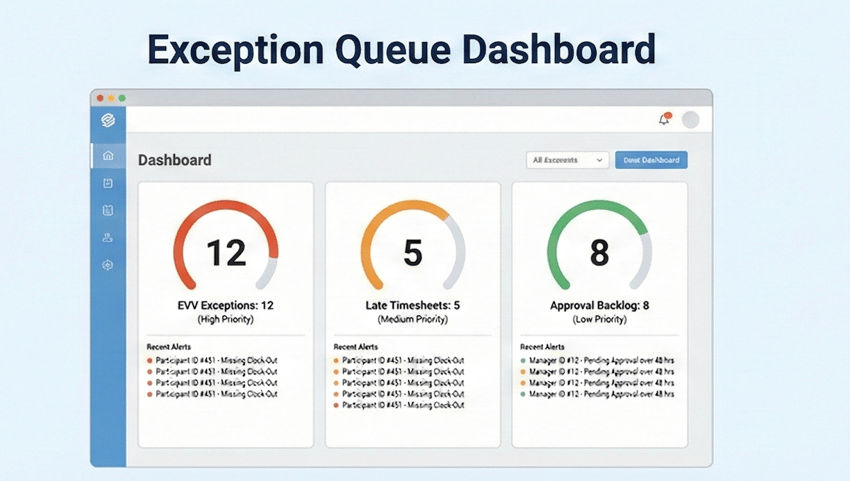
What a strong platform provides is electronic timesheets with a clear multi-step approval chain, EVV capture or a verified integration with your state's required system, exception queues organized by type — late submissions, missing punches, location mismatches, edit requests after approval — with routing that gets each exception to the right person for resolution, and an audit log that preserves the complete history of every edit and approval with timestamps and reason codes. The audit log isn't a report you generate when something goes wrong. It's the continuous record that makes every transaction defensible from the moment it's created. Our EVV software features checklist covers what to require from any EVV-connected system in more detail.
Self-direction lives and dies on how quickly and safely workers can be onboarded. In programs running employer authority models, the participant is directing who works for them, but the FMS organization carries the compliance obligation to ensure that worker meets documentation, verification, and authorization requirements before the first paycheck is issued.
A platform that handles this well gives you configurable onboarding checklists that reflect your program's specific requirements, role-based task assignment so the right person handles each step rather than everything landing in a general queue, progress visibility so supervisors and support brokers know where a case stands without calling someone, and safeguards that prevent service delivery or payment from proceeding until required steps are complete. The last element is what separates a checklist tool from a compliance tool — one records what was done, the other prevents what can't happen yet.
Worker onboarding is also where participant experience starts. A family that chooses consumer direction because they want control over who cares for their loved one will lose confidence in the model quickly if their chosen worker can't get paid for three weeks because documentation is stuck in a manual queue. The platform's onboarding speed is a direct factor in participant satisfaction — and ultimately in whether they stay in the self-direction model or switch back to agency direction.
Billing and reporting are where many self-direction implementations quietly fail, because they're often treated as a downstream module rather than a core design requirement. A platform can have a billing feature and still create systematic denials if the documentation doesn't cleanly map to authorization and unit rules, if services are coded incorrectly, or if exceptions aren't surfaced and resolved before the billing run.
The evaluation question that reveals the most is: show me your exception queue and walk me through how a billing-readiness issue gets identified and resolved before submission. That demonstration tells you more about a vendor's operational depth than any claims-processing feature list. Equally important is ERA posting support and reconciliation tooling — the back half of the billing cycle that determines how quickly payments are matched, discrepancies are flagged, and the cycle closes cleanly. For a deeper look at how billing gaps translate directly into denied claims, our piece on avoiding Medicaid waiver billing denials in HCBS covers the specific failure patterns worth asking vendors about.
Self-direction involves many stakeholders with genuinely different access needs and different information boundaries. Participants need budget and timesheet visibility. Support brokers need case status and alerts. Internal payroll staff need timesheet and tax records. Operations supervisors need exception queues and cycle-time reporting. State oversight reviewers need exportable audit packets.
A permissions structure that can't reflect those distinctions creates two kinds of risk: over-exposure of sensitive information to people who shouldn't have it, and access gaps that force workarounds that undermine the audit trail. The audit trail itself needs to be immutable and complete — covering who approved what, when it was approved, what was edited, and why — and it needs to be exportable in a form that works for state review rather than requiring manual assembly.
This is the section most vendor demos skip entirely, and it's one of the most important factors in whether a platform actually works for your program after go-live.
Self-direction programs are federally enabled but state-administered, which means the EVV requirements, reporting formats, billing rules, authorization workflows, and allowable service definitions vary significantly from state to state. A platform that works seamlessly in one state's HCBS waiver program may require significant configuration — or may lack key capabilities entirely — for another. And "we support your state" from a vendor means very different things depending on whether they have existing customers actively billing under your state's specific program or whether they're describing a general Medicaid capability that hasn't been tested in your context.
The questions worth asking in every evaluation: Do you have current customers operating under this specific state program and waiver type, not just in this state generally? Has your EVV integration been tested and approved by this state's designated aggregator? Can you produce the specific reporting format this state's oversight agency requires, in the exact format they accept? What happened the last time this state changed its reporting requirements mid-year — how long did it take to update, and who absorbed the work?
That last question is the most revealing. State requirements do change. Reporting formats get updated. New EVV aggregators are mandated. A platform built for flexibility handles those changes as a routine software update. A platform built around a single state's workflow requires custom development every time, and the cost and timeline of that work land on your program. For organizations operating across multiple states — which is increasingly common as self-directed Medicaid home care services expand nationally — multi-state capability isn't a nice-to-have. It's a selection filter.
The most common evaluation mistake is spending too much time on what's easiest to demo — the interface, the dashboard, the participant portal — and not enough time on the operational reality that determines whether the platform actually protects your program.
The first layer is compliance fit, and it functions as a gate rather than a score. If a vendor can't demonstrate that the platform enforces spending plan rules automatically, produces your state's required reporting formats, and supports EVV requirements either natively or through a verified integration in production today, the evaluation stops there. Compliance gaps don't get fixed in implementation.
The second layer is operational resilience, and it carries the most weight. How fast does the exception workflow process an exception from identification to resolution, and who handles each step? What does visibility into processing backlog actually look like for a supervisor? Does the role-based access structure map to your organization without workarounds? Is the audit trail complete enough to reconstruct the full approval history for any transaction on demand? These questions get at how the platform performs under the volume and variability of real self-direction operations, not just in the clean-path demo scenario.
The third layer is adoption and stakeholder experience. Can participants and authorized representatives navigate their budget and timesheet workflows without calling your office for help? Can support brokers get the information they need without creating tickets? What does the vendor's training and support model actually look like, and what happens when something needs resolution outside of business hours? Adoption is what determines whether the platform delivers its compliance value in practice or just on paper.
Don't ask vendors to show you the dashboard. Ask them to demonstrate specific failure scenarios — the ones that represent the daily reality of self-direction operations. Here are the seven that reveal the most:
1. A late timesheet submitted after cutoff. How does the system handle it, who gets notified, and what's the resolution workflow? 2. A timesheet edit request after approval. What does the audit trail show, and who has to approve the correction? 3. An EVV exception that needs resolution. How is it surfaced, to whom is it routed, and how is it closed with a documentable record? 4. A budget category approaching its limit. When does the alert trigger, who receives it, and what options does the platform provide for response?
The scenarios that reveal the most are the edge cases around denial and explanation. 5. A purchase request that should be denied because it falls outside the approved plan — does the system prevent it automatically, and does it explain why in language the participant can understand? 6. A worker onboarding case with a missing required document — how long before it's surfaced, and what prevents the worker from being paid before it's resolved? 7. A full audit export for a single participant for a prior quarter — how long does it take, what format does it come in, and is it actually complete without manual assembly?
If a vendor can move through all seven of those scenarios cleanly without switching to a prepared environment or deferring to implementation, they're showing you what the platform actually does. If they stumble or defer, they're showing you what your operations staff will be managing manually after go-live. For a parallel framework specifically for EVV vendor demos, our EVV software demo checklist covers the same principle applied to visit verification evaluation.
The first pitfall is buying a portal instead of an operational system. A platform that looks good in a demo but can't enforce spending rules or surface exceptions proactively is a future compliance problem. The interface quality is real, but it's not what protects your program — the underlying workflow logic is.
The second pitfall is underestimating exception volume. In self-direction, exceptions are not edge cases — they are the daily work. Missed punches, late timesheets, budget threshold alerts, and edit requests after approval happen at volume in any program of meaningful size. Organizations that evaluate platforms on clean-path scenarios and then go live at scale discover the exception volume gap quickly, and it lands entirely on their operations team.
The third pitfall is fragmented tools that make your organization the integration layer. When budgets, EVV, payroll, claims, and reporting live in separate systems, someone on your staff is reconciling them every pay cycle. That reconciliation work carries error risk and creates the documentation gaps that auditors find. A connected platform eliminates a category of rework that shouldn't exist.
The fourth pitfall is weak permissions and incomplete audit trails. If you can't prove who approved what and why — for any transaction, on demand, in a format a state reviewer can work with — you're carrying audit risk regardless of whether the underlying services were appropriate. That risk shows up the first time you're asked to produce documentation for a review and discover that assembling it requires hours of manual work across disconnected systems.
The fifth pitfall — one that rarely gets mentioned — is underinvesting in implementation. The most common post-go-live complaint from FMS organizations isn't that they chose the wrong platform. It's that they went live before the platform was actually configured for their workflows. "Implementation included" in a vendor contract often means the system is turned on, not that it's tuned. Budget time for workflow configuration, staff training, a pilot run with a subset of participants, and a structured go-live review before you're operating at full volume. The platforms that fail in year one usually failed in the implementation month, not on the product side.
Most FMS platforms were built as single-purpose tools — payroll only, EVV only, portal only — and then positioned as complete solutions as the self-direction market grew. The operational cost of that architecture is that your team becomes the reconciliation layer between modules, exporting data between systems and assembling documentation that a connected platform would produce automatically.
We've built Ankota for HCBS organizations managing complexity across multiple service lines — home care, adult day, IDD services, and self-direction programs — where the compliance requirements, billing structures, and documentation standards differ by program but the cost of running entirely separate systems for each one compounds quickly. For self-direction programs specifically, that means employer authority and budget authority workflows that connect to EVV, scheduling, and Medicaid billing within the same platform. The exception queue that surfaces a missed punch connects to the same approval chain that feeds payroll, which connects to the same billing-ready documentation that supports the claim.
We've also built AI-assisted oversight capabilities into Ankota's operations layer to surface exceptions and risk signals earlier, so your team is responding to problems rather than discovering them. In an environment where DSP and FMS staff capacity is under constant pressure, reducing the administrative burden of exception management isn't a convenience — it's how programs stay operationally sound as they grow. If you want to understand why participants choose one FMS provider over another — and what that means for how your platform needs to perform — our piece on why self-directed participants choose their fiscal intermediary covers the competitive landscape from the participant's perspective.
A winning self-direction FMS software comparison isn't about the best user interface. It's about selecting a platform that makes budget authority manageable, exceptions visible and routable, approvals fully documentable, and state reporting reliably producible — while improving the experience for participants, workers, and support brokers at the same time.
Use the five-capability framework to filter candidates, the three-layer scorecard to score them, and the seven demo scenarios to prove what they actually do before you sign. The platform that handles all seven scenarios cleanly — in a live environment, with your use cases rather than a prepared script — is the platform built for self-direction operations rather than built to look good in an evaluation.
If you'd like to work through this framework with your specific program model, request an Ankota conversation. We'll map your state's requirements, your operational pain points, and your EVV and billing structure to a shortlist and a practical comparison timeline — not a quarter-long process.
Feature comparison tells you what a platform claims to do. Workflow resilience comparison tells you how the platform performs when things don't go as planned — which in self-direction is most of the time. The features that matter most in self-direction aren't visible in a standard demo: how exceptions are surfaced and routed, whether spending plan limits are enforced automatically or caught manually after the fact, how complete the audit trail is for edited transactions, and how quickly the exception queue clears under real volume. A platform that can demonstrate those things live, with your scenarios rather than prepared examples, is showing you resilience. A platform that can only walk through clean-path workflows is showing you the demo version.
CMS's budget authority framework gives participants meaningful control over pay rates, service mix, and spending priorities within their approved plan. That flexibility increases the FMS organization's operational responsibility: the platform must enforce spending boundaries automatically, provide real-time balance visibility to appropriate stakeholders, surface burn-rate risk early enough to allow a response, and maintain a complete audit trail linking every transaction to its authorization, approval, and service documentation. A platform that logs transactions after the fact without proactive alerts and enforcement controls isn't meeting the spirit of budget authority management — it's creating the appearance of oversight without the substance of it.
Ask the vendor to demonstrate the EVV workflow live in a scenario with an exception — a missed punch, a location mismatch, or a late submission. Watch how the exception is surfaced, to whom it's routed, and how it's documented through to resolution. Then ask specifically: is this EVV integration in production today with programs under my state's authority, or is it on the roadmap? A vendor with proven EVV deployments in your state can name current customers operating under the same model. A vendor who describes it as a partner integration or a future capability is flagging a gap that will cost you time and money to close after go-live.
In our experience, the failure points are consistent. The first is insufficient workflow configuration before go-live — the system is technically deployed but not configured for the organization's actual processes, so the team spends the first months building workarounds. The second is underestimated exception volume: the daily flood of late timesheets, missing punches, and budget alerts overwhelms a team that evaluated the platform on clean-path demos. The third is fragmented data across modules or systems that forces manual reconciliation every pay cycle. All three are avoidable with a phased implementation, a pilot program before full deployment, and an honest pre-go-live audit of whether the system is actually configured for your workflows rather than just turned on.
Structure the demo around seven specific failure scenarios rather than asking for a dashboard tour. Request a live walkthrough of a late timesheet past cutoff, a timesheet edit after approval, an EVV exception requiring resolution, a budget category approaching exhaustion, a purchase request that should be denied with an explanation, a worker onboarding case with a missing document, and a full audit export for a participant for a prior quarter. Ask the vendor to demo each one in their live environment rather than a prepared demo instance. The quality of their responses to those seven scenarios tells you more about operational readiness than anything else in the evaluation process.
The most important ones: "we can do that with a custom report" means the capability doesn't exist as a product feature and won't enforce rules automatically. No clear exception workflow in a space where exceptions are the daily work — not the edge case — is a structural problem. EVV described as a roadmap item or a future partner integration means you'll pay for that gap when it becomes an audit finding. Permissions that are too simple for the role structure of your program mean you'll build workarounds that compromise your audit trail. And an implementation plan that is primarily self-serve signals that the vendor's business model doesn't depend on your success after go-live — which is exactly when you need support most.
Significantly. Self-direction programs are federally enabled but state-administered, which means EVV requirements, reporting formats, billing rules, and authorization workflows vary by state. A platform that works in one state's waiver program may need substantial configuration — or may lack key capabilities — for another. The questions to ask are: do you have current customers billing under this specific state program, has your EVV integration been tested with this state's aggregator, and what happened the last time this state changed its reporting requirements? Organizations operating across multiple states should treat multi-state production capability as a selection filter, not a feature to evaluate later.
Ankota's mission is to enable the Heroes who keep older and disabled people living at home to focus on care because we take care of the tech. If you need software for home care, EVV, I/DD Services, Self-Direction FMS, Adult Day Care centers, or Caregiver Recruiting, please Contact Ankota. And if you're ready to see how the most innovative agencies are using AI to empower their caregivers and automate the rest, meet your new companion at www.kota.care.

Aditya Chaudhry is a STEM MBA candidate at Babson College (graduating May 2026), focusing on AI and statistics. He leverages his successful background driving company growth in India to deliver impactful data-driven solutions.
.png)
.png)




Trusted by home care agencies nationwide